
Area Graph Demonstration
Loading the math board and drawing, please wait…
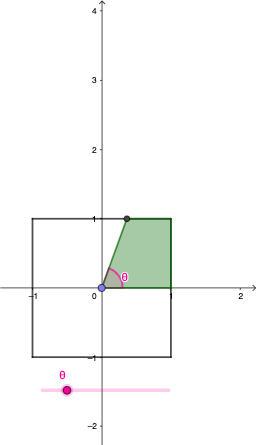
This example demonstrates the dynamic graphing of area calculations through geometric constructions. It involves core math concepts like angles, area, function graphs, Poisson distribution, tangent functions, ellipses, arithmetic operations, and indefinite integrals. The construction utilizes commands such as Segment, Point, Intersect, Rotate, Angle, Ray, Polygon, and objects like A, B, C, D, f, g, h, i, θ, etc. It is suitable for high school and above, focusing on visualizing function graphs, integral calculations, and geometric transformations.
GeoGebra Commands & Parameters
Segment(A, D) → fSegment(D, C) → gSegment(C, B) → hSegment(B, A) → iPoint(yAxis) → EIntersect(h, xAxis) → FRotate(F, θ, E) → F'Angle(F, E, F') → βRay(E, F') → jIntersect(h, j) → GPolygon(E, G, F) → t1, f_1, e, g_1Intersect(i, j) → HPolygon(H, B, F, E) → q1, h_1, b, f_2, e_1Intersect(f, j) → IPolygon(I, E, F, B, A) → poly1, i_1, e_2, f_3, b_1, aIntersect(g, j) → JPolygon(J, D, A, B, F, E) → poly2, j_1, d, a_1, b_2, f_4, e_3Polygon(E, G, C, D, A, B, F) → poly3, e_4, g_2, c, d_1, a_2, b_3, f_5Segment(I, E) → k
AI Drawing Prompt Reference
On a coordinate plane, first draw a polygonal framework by connecting four main vertices to form a closed boundary. Include a horizontal axis as a reference line and mark a point where one boundary edge intersects this axis. Rotate that intersection point around the fixed origin by a given angle to obtain the rotated point, then measure the angle at the origin between the origin-to-intersection direction and the origin-to-rotated-point direction. From the origin, draw a ray through the rotated point and find its intersections with the existing boundary edges to get additional key intersection points. Use these intersections together with the original vertices to construct several polygonal regions that overlap and nest, illustrating different area shapes. Finally, draw a segment from one intersection point back to the origin as an auxiliary edge.
The prompt above was compiled from the original drawing commands and is for reference only.