
Area Demonstration (1)
Loading the math board and drawing, please wait…
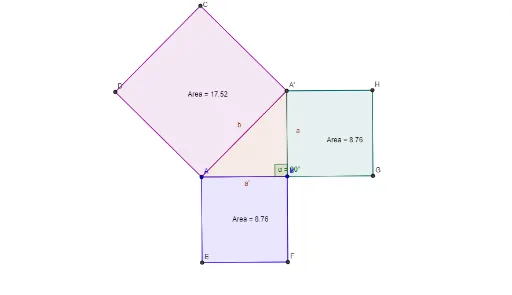
This example demonstrates the concept of area through specific geometric transformations and polygon constructions. Key mathematical concepts include geometric transformations, polygons, and area calculation. Using commands such as rotation, angle, and polygon, users can dynamically observe and understand the impact of geometric transformations on area.
GeoGebra Commands & Parameters
Rotate(A, 270°, B) → A'Angle(A', B, A) → αPolygon(A, B, A') → polígono1, a', a, bPolygon(A, A', 4) → polígono2, a_1, a'_1, c, d, C, DPolygon(B, A, 4) → polígono3, b_1, a_2, e, f, E, FPolygon(A', B, 4) → polígono4, a'_2, b_2, g, h, G, H
AI Drawing Prompt Reference
Draw a geometric area demonstration. Start with two points, rotate one point around the other by 270 degrees counterclockwise to get a third point. Connect these three points to form a triangle, and mark the rotation angle. Then, on each side of the triangle, construct a square outward, so each square shares one side with the triangle. The final figure consists of a central triangle and three surrounding squares, illustrating how rotation and polygon construction affect area.
The prompt above was compiled from the original drawing commands and is for reference only.