
Area and Perimeter
Loading the math board and drawing, please wait…
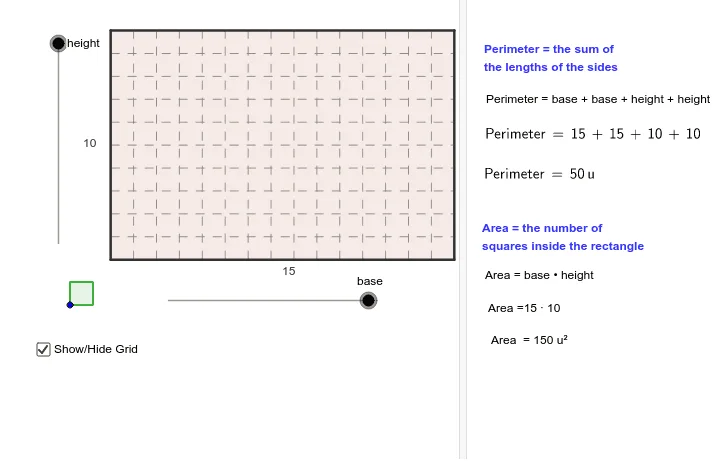
This example demonstrates how to calculate the area and perimeter of shapes using geometric construction. Key mathematical concepts include area, perimeter, parametric curves, conic sections, and centroid or barycenter. Using GeoGebra commands such as Sequence, Polygon, and Circle, dynamic visualizations of these concepts are provided. Suitable for students at the middle school level and above.
GeoGebra Commands & Parameters
Sequence((x(A) + (unitsize * i), y(A)), i, 1, base) → list1Sequence((x(A) + (unitsize * i), y(A) + (height * unitsize)), i, 1, base) → list2Sequence((x(A), y(A) + (unitsize * i)), i, 1, height) → list3Sequence((x(A) + base, y(A) + (unitsize * i)), i, 1, height) → list4Polygon(A, Element[list1, base], Element[list2, base], Element[list3, height]) → poly1, a, b, c, dCircle(B, unitsize) → fPoint(f) → CCircle(C, unitsize) → gPolygon(B, C, 4) → poly2, h, i, j, k, D, ESequence(Segment[(x(A), y(A) + (unitsize * i)), (x(A) + (base * unitsize), y(A) + (unitsize * i))], i, 0, height) → dottedhorizontalsSequence(Segment[(x(A) + (unitsize * i), y(A)), (x(A) + (unitsize * i), y(A) + (height * unitsize))], i, 0, base) → dottedverticals
AI Drawing Prompt Reference
Draw a rectangle composed of multiple horizontal and vertical lines, labeling its area and perimeter. Inside the rectangle, draw a circle, and outside the rectangle, draw a square, connecting the two shapes with dashed lines. Demonstrate the geometric construction of parametric curves and conic sections, and label the centroid or barycenter.
The prompt above was compiled from the original drawing commands and is for reference only.