
Area and Perimeter Calculation by Karen Handy
Loading the math board and drawing, please wait…
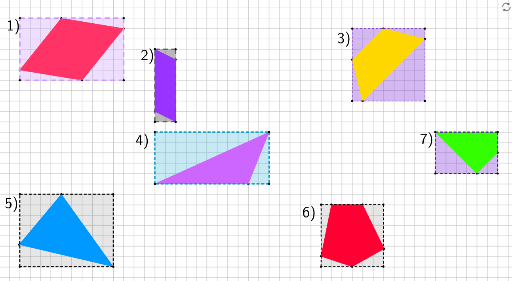
This example demonstrates how to calculate the area and perimeter of polygons using GeoGebra. Key math concepts include polygons, area, perimeter, and coordinate geometry. Construction highlights involve commands like Polygon and Segment. Suitable for middle school students and above for learning geometric properties and practicing geometric constructions.
GeoGebra Commands & Parameters
Polygon(A, B, C, D) → poly1, a, b, c, dPolygon(E, F, G, H) → poly2, e, f, g, hPolygon(I, J, K, L) → poly3, i, j, k, lPolygon(M, N, O) → poly4, o, m, nPolygon(P, Q, R, S) → poly5, p, q, r, sPolygon(T, U, V, W, Z) → poly6, t, u, v, w, z_1Polygon(A_1, B_1, C_1) → poly7, c_1, a_1, b_1Segment(D_1, E_1) → f_1Segment(E_1, F_1) → g_1Segment(F_1, G_1) → h_1Segment(G_1, D_1) → i_1Polygon(H_1, I_1, J_1, K_1) → poly8, h_2, i_2, j_1, k_1Polygon(L_1, M_1, N_1, O_1) → poly9, l_1, m_1, n_1, o_1Polygon(P_1, Q_1, R_1, S_1) → poly10, p_1, q_1, r_1, s_1Polygon(T_1, U_1, V_1, W_1) → poly11, t_1, u_1, v_1, w_1Polygon(Z_1, A_2, B_2, C_2, D_2) → poly12, z_2, a_2, b_2, c_2, d_2Polygon(E_2, F_2, G_2, H_2) → poly13, e_2, f_2, g_2, h_3Polygon(I_2, J_2, K_2, L_2) → poly14, i_3, j_2, k_2, l_2
AI Drawing Prompt Reference
Draw multiple polygons, including pentagons, quadrilaterals, and hexagons, showing their sides and vertices. Start by drawing several quadrilaterals, then add some pentagons and hexagons, connecting their vertices with line segments to form a complex geometric pattern. Label the vertices and sides of each polygon for calculating area and perimeter.
The prompt above was compiled from the original drawing commands and is for reference only.