
Arc Length and Sector Area
Loading the math board and drawing, please wait…
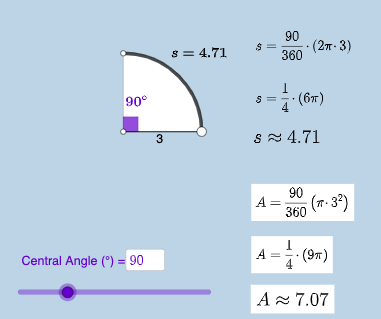
This example demonstrates the calculation of arc length and sector area. It involves the geometric properties of circles and area calculations. Using GeoGebra commands such as Point, Ray, Circle, Segment, Rotate, etc., it constructs objects like arcs, sectors, and angles. Suitable for students in middle school and above to learn about circle-related knowledge.
GeoGebra Commands & Parameters
Point(yAxis) → ARay(A, (1, 0)) → hPoint(h) → BCircle(A, B) → cSegment(A, B) → fRotate(B, (a * pi / 180), A) → B'Angle(B, A, B') → αCircleArc(A, B, B') → dSegment(A, B') → gCircleSector(A, B, B') → eTextfield(a) → InputBox1Area(c) → lCircumference(c) → mTextfield(n) → InputBox2FractionText(a / 360) → text8
AI Drawing Prompt Reference
Draw a circle with the center on the y-axis, passing through a point. Draw a ray from the center to that point. Rotate the point to form an angle. Draw an arc and a sector based on the center and the point. Add text boxes to display the angle and fraction.
The prompt above was compiled from the original drawing commands and is for reference only.