
Apple Surface
Loading the math board and drawing, please wait…
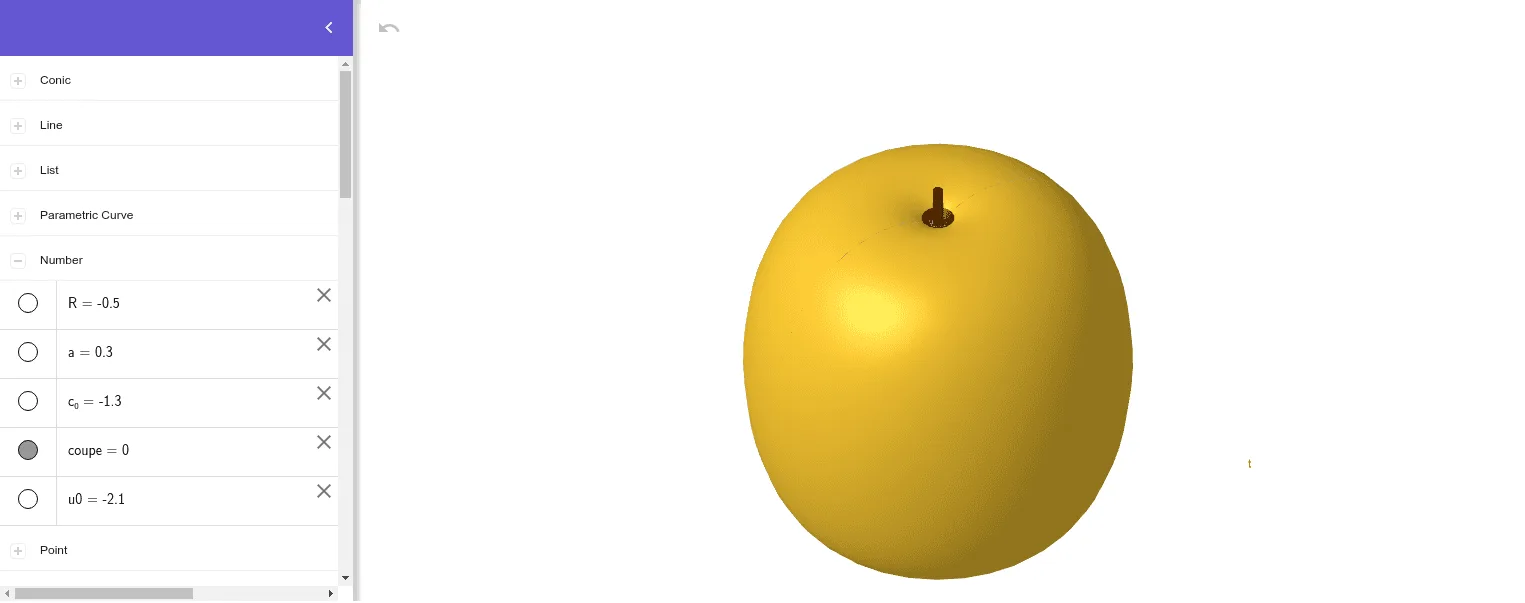
This example demonstrates how to draw an apple-shaped surface using GeoGebra. Key mathematical concepts include surface, calculus, and trigonometric functions. By using commands like Surface, CurveCartesian, and Sequence, complex geometric shapes can be constructed. Suitable for high school and above students to learn and explore.
GeoGebra Commands & Parameters
Surface(x(B) + ((R * cos(u)) * (4 + (3.8 * cos(v)))), y(B) + ((R * sin(u)) * (4 + (3.8 * cos(v)))), z(B) - (R * ((((cos(v) + sin(v) - 1) * (1 + sin(v))) * log(1 - (π * v / 10))) + (7.5 * sin(v)))), u, 0, 3.141592653589793, v, -2.20159, 2.6415) → bSurface(x(B) + ((R * cos(u)) * (4 + (3.8 * cos(v)))), y(B) + ((R * sin(u)) * (4 + (3.8 * cos(v)))), z(B) - (R * ((((cos(v) + sin(v) - 1) * (1 + sin(v))) * log(1 - (π * v / 10))) + (7.5 * sin(v)))), u, 0, 3.141592653589793, v, 2.6415, 3.141592653589793) → cSurface(x(A) + ((R * cos(u)) * (4 + (3.8 * cos(v)))), y(A) - ((R * sin(u)) * (4 + (3.8 * cos(v)))), z(A) - (R * ((((cos(v) + sin(v) - 1) * (1 + sin(v))) * log(1 - (π * v / 10))) + (7.5 * sin(v)))), u, 0, 3.141592653589793, v, -2.20159, 2.6415) → fCurveCartesian(x(A) + (R * (4 + (3.8 * cos(v)))), y(A), z(A) - (R * ((((cos(v) + sin(v) - 1) * (1 + sin(v))) * log(1 - (π * v / 10))) + (7.5 * sin(v)))), v, -2.20159, 2.6415) → eCurveCartesian(x(A) - (R * (4 + (3.8 * cos(v)))), y(A), z(A) - (R * ((((cos(v) + sin(v) - 1) * (1 + sin(v))) * log(1 - (π * v / 10))) + (7.5 * sin(v)))), v, -2.20159, 2.6415) → gSequence((x(A) - (R * (4 + (3.8 * cos(v)))), y(A), z(A) - (R * ((((cos(v) + sin(v) - 1) * (1 + sin(v))) * log(1 - (π * v / 10))) + (7.5 * sin(v))))), v, -3.14159, 4.71239, 0.2) → liste1Sequence(Polygon[Element[liste1, i], Element[liste1, i + 1], A], i, 1, Length[liste1]) → liste2Sequence((x(A) + (R * (4 + (3.8 * cos(v)))), y(A), z(A) - (R * ((((cos(v) + sin(v) - 1) * (1 + sin(v))) * log(1 - (π * v / 10))) + (7.5 * sin(v))))), v, -3.14159, 4.71239, 0.2) → liste3Sequence(Polygon[Element[liste3, i], Element[liste3, i + 1], A], i, 1, Length[liste3]) → liste4Sequence((x(B) - (R * (4 + (3.8 * cos(v)))), y(B), z(B) - (R * ((((cos(v) + sin(v) - 1) * (1 + sin(v))) * log(1 - (π * v / 10))) + (7.5 * sin(v))))), v, -3.14159, 4.71238898038469, 0.2) → liste5Sequence((x(B) + (R * (4 + (3.8 * cos(v)))), y(B), z(B) - (R * ((((cos(v) + sin(v) - 1) * (1 + sin(v))) * log(1 - (π * v / 10))) + (7.5 * sin(v))))), v, -3.14159, 4.71238898038469, 0.2) → liste6Sequence(Polygon[Element[liste6, i], Element[liste6, i + 1], B], i, 1, Length[liste6]) → liste8Sequence(Polygon[Element[liste5, i], Element[liste5, i + 1], B], i, 1, Length[liste5]) → liste7Surface(x(A) + ((R * cos(u)) * (4 + (3.8 * cos(v)))), y(A) - ((R * sin(u)) * (4 + (3.8 * cos(v)))), z(A) - (R * ((((cos(v) + sin(v) - 1) * (1 + sin(v))) * log(1 - (π * v / 10))) + (7.5 * sin(v)))), u, 0, 3.141592653589793, v, 2.6415, 3.141592653589793) → hSurface(x(B) + ((R * cos(u)) * (4 + (3.8 * cos(v)))), y(B) + ((R * sin(u)) * (4 + (3.8 * cos(v)))), z(B) + 0.2 - (R * ((((cos(v) + sin(v) - 1) * (1 + sin(v))) * log(1 - (π * v / 10))) + (7.5 * sin(v)))), u, 0, 3.141592653589793, v, -3.14159, -2.2) → dPolygon(C, D, A) → poly1, a_1, c_1, d_1Polygon(E, F, B) → poly2, b_1, e_1, f_1Polygon(A, G, H) → poly3, h_1, a_2, g_1Polygon(B, K, J) → poly4, j_1, b_2, kSurface(x(A) + ((R * cos(u)) * (4 + (3.8 * cos(v)))), y(A) - ((R * sin(u)) * (4 + (3.8 * cos(v)))), z(A) - (R * ((((cos(v) + sin(v) - 1) * (1 + sin(v))) * log(1 - (π * v / 10))) + (7.5 * sin(v)))), u, 0, 3.141592653589793, v, -3.14159, -2.2) → iSurface(x(B) + ((R * cos(u)) * (4 + (3.8 * cos(v)))), y(B) - ((R * sin(u)) * (4 + (3.8 * cos(v)))), z(B) - (R * ((((cos(v) + sin(v) - 1) * (1 + sin(v))) * log(1 - (π * v / 10))) + (7.5 * sin(v)))), u, 3.141592653589793, 6.28319, v, -3.14159, -2.22) → lCurveCartesian(x(A) + (2.5 * cos(t)), y(A), z(A) + (2 * sin(t)), t, 0, 6.28319) → jCurveCartesian(x(L) + (0.15 * cos(t)), y(L) - 0.3, z(L) + (0.3 * sin(t)), t, 0, 6.28319) → mCurveCartesian(x(M) + (0.15 * cos(t)), y(M) - 0.3, z(M) + (0.3 * sin(t)), t, 0, 6.28319) → nCurveCartesian(x(N) + (0.15 * cos(t)), y(N) - 0.3, z(N) + (0.3 * sin(t)), t, 0, 6.28319) → oCurveCartesian(x(P) + (0.15 * cos(t)), y(P) - 0.3, z(P) + (0.3 * sin(t)), t, 0, 6.28319) → pCircumcircleArc(C, Q, A) → qCircumcircleArc(D, S, A) → rPointIn(poly2) → VCircumcircleArc(F, U, B) → sPointIn(poly2) → WCircumcircleArc(E, T, V) → tPoint(liste2) → C_1CircumcircleArc(A_1, Z, B_1) → k_1Mirror(k_1, A) → p_1Mirror(k_1, O) → q_1Mirror(p_1, O) → r_1CircumcircleArc(E_1, D_1, A) → s_1CircumcircleArc(F_1, G_1, A) → t_1Line(O, H_1) → i_1Mirror(t_1, i_1) → c_2Mirror(s_1, i_1) → d_2
AI Drawing Prompt Reference
Draw an apple-shaped surface with two symmetric hemispherical surfaces and a bottom indentation. Use parametric equations to define the surface and generate complex geometric shapes through rotation and transformation. First, draw the two hemispherical surfaces, then add the bottom indentation, and finally, draw the details of the apple surface, such as spots and indentations.
The prompt above was compiled from the original drawing commands and is for reference only.