
Another Fractal Curve
Loading the math board and drawing, please wait…
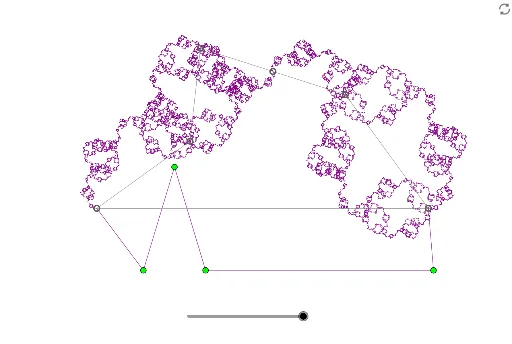
This example demonstrates the generation process of another fractal curve. Fractal geometry is a branch of mathematics that studies complex structures, involving self-similarity, iteration, and infinite detail. Using GeoGebra commands such as Segment, Midpoint, and PolyLine, a fractal curve can be constructed. Suitable for high school students or math enthusiasts to learn the basic concepts of fractal geometry.
GeoGebra Commands & Parameters
Segment(A, B) → fSegment(B, C) → gSegment(C, D) → hSegment(D, E) → iMidpoint(h) → FSegment(C, F) → jSegment(F, D) → kSegment(A, E) → lPolyLine(A, G, H, I, J, E) → mRotate(PolyLine[Dilate[A, f / l, A], Dilate[G, f / l, A], Dilate[H, f / l, A], Dilate[I, f / l, A], Dilate[J, f / l, A], Dilate[E, f / l, A]], Angle[l, f], A) → A1Rotate(Translate[PolyLine[Dilate[A, g / l, A], Dilate[G, g / l, A], Dilate[H, g / l, A], Dilate[I, g / l, A], Dilate[J, g / l, A], Dilate[E, g / l, A]], B - A], Angle[l, g], B) → B1Rotate(B1, π, Midpoint[g]) → C1Mirror(Rotate[Translate[Rotate[PolyLine[Dilate[A, j / l, A], Dilate[G, j / l, A], Dilate[H, j / l, A], Dilate[I, j / l, A], Dilate[J, j / l, A], Dilate[E, j / l, A]], Angle[l, f], A], F - A], Angle[f, j] + π, F], j) → D1Rotate(D1, π, F) → E1Mirror(Rotate[PolyLine[Dilate[A, i / l, E], Dilate[G, i / l, E], Dilate[H, i / l, E], Dilate[I, i / l, E], Dilate[J, i / l, E], Dilate[E, i / l, E]], Angle[l, i], E], i) → F1Rotate(F1, π, Midpoint[i]) → G1Rotate(Dilate[{A1, B1, C1, D1, E1, F1, G1}, f / l, A], Angle[l, f], A) → A2Rotate(Translate[Dilate[{A1, B1, C1, D1, E1, F1, G1}, g / l, A], B - A], Angle[l, g], B) → B2Rotate(B2, π, Midpoint[g]) → C2Rotate(Translate[Rotate[Dilate[{A1, B1, C1, D1, E1, F1, G1}, j / l, A], Angle[l, f], A], F - A], Angle[f, j] + π, F) → D2Rotate(D2, π, F) → E2Mirror(Rotate[Dilate[{A1, B1, C1, D1, E1, F1, G1}, i / l, E], Angle[l, i], E], i) → F2Rotate(F2, π, Midpoint[i]) → G2Rotate(Dilate[{A2, B2, C2, D2, E2, F2, G2}, f / l, A], Angle[l, f], A) → A3Rotate(Translate[Dilate[{A2, B2, C2, D2, E2, F2, G2}, g / l, A], B - A], Angle[l, g], B) → B3Rotate(B3, π, Midpoint[g]) → C3Rotate(Translate[Rotate[Dilate[{A2, B2, C2, D2, E2, F2, G2}, j / l, A], Angle[l, f], A], F - A], Angle[f, j] + π, F) → D3Rotate(D3, π, F) → E3Mirror(Rotate[Dilate[{A2, B2, C2, D2, E2, F2, G2}, i / l, E], Angle[l, i], E], i) → F3Rotate(F3, π, Midpoint[i]) → G3Rotate(Dilate[{A3, B3, C3, D3, E3, F3, G3}, f / l, A], Angle[l, f], A) → A4Rotate(Translate[Dilate[{A3, B3, C3, D3, E3, F3, G3}, g / l, A], B - A], Angle[l, g], B) → B4Rotate(B4, π, Midpoint[g]) → C4Rotate(Translate[Rotate[Dilate[{A3, B3, C3, D3, E3, F3, G3}, j / l, A], Angle[l, f], A], F - A], Angle[f, j] + π, F) → D4Rotate(D4, π, F) → E4Mirror(Rotate[Dilate[{A3, B3, C3, D3, E3, F3, G3}, i / l, E], Angle[l, i], E], i) → F4Rotate(F4, π, Midpoint[i]) → G4Rotate(Dilate[{A4, B4, C4, D4, E4, F4, G4}, f / l, A], Angle[l, f], A) → A5Rotate(Translate[Dilate[{A4, B4, C4, D4, E4, F4, G4}, g / l, A], B - A], Angle[l, g], B) → B5Rotate(B5, π, Midpoint[g]) → C5Rotate(Translate[Rotate[Dilate[{A4, B4, C4, D4, E4, F4, G4}, j / l, A], Angle[l, f], A], F - A], Angle[f, j] + π, F) → D5Rotate(D5, π, F) → E5Mirror(Rotate[Dilate[{A4, B4, C4, D4, E4, F4, G4}, i / l, E], Angle[l, i], E], i) → F5Rotate(F5, π, Midpoint[i]) → G5