
Animation to Show the Area of a Parallelogram
Loading the math board and drawing, please wait…
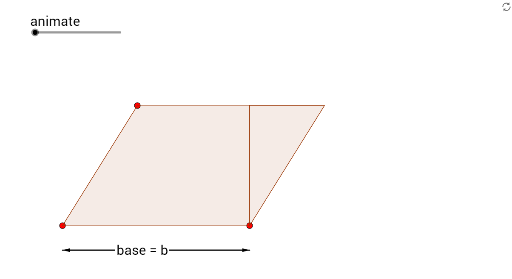
① This example uses an animated visual to demonstrate that the area of a parallelogram equals base times height, by cutting and translating a part to form an equivalent rectangle. ② Core mathematical concepts include the parallelogram area formula, geometric transformation (translation), and the principle of area conservation. ③ Construction details: GeoGebra commands such as Point, Polygon, Vector, Translate, DynamicCoordinates, and Semicircle are used to build the parallelogram, its translated copy, and auxiliary height lines; sliders drive the animation, and text objects display the area calculation. ④ Suitable for middle school geometry lessons, helping students grasp the derivation of the area formula, and useful for classroom demonstrations or self-paced exploration.
GeoGebra Commands & Parameters
Point(xAxis) → HPoint(xAxis) → ISort({H, I}) → list1Element(list1, 1) → AElement(list1, 2) → BDynamicCoordinates(K, Min[Max[x(K), x(A)], (x(A) + x(B)) / 2], y(K)) → LSemicircle(C, B) → dPoint(d, 1 - animate) → GVector(H - (0, 1), I - (0, 1)) → uVector(I - (0, 1), H - (0, 1)) → vVector(J, M) → wVector(M, J) → jVector(N, J) → kVector(J, N) → lPolygon(H, E, D) → poly1, d_1, h, eTranslate(H, Vector[(animate * Vector[H, I])]) → H'Translate(E, Vector[(animate * Vector[H, I])]) → E'Translate(D, Vector[(animate * Vector[H, I])]) → D'Polygon(H', E', D') → poly1', d', h', e'Polygon(I, L, (x(I), y(L))) → poly2, f, i, l_1Polygon(H, I, L, (x(H), y(L))) → poly3, h_1, i_1, l_2, mPolygon(D, H, (x(H), y(D))) → poly4, n, d_2, h_2