
Transformation Golf Hole 9: A Challenge of Reflection, Rotation, and Translation
Loading the math board and drawing, please wait…
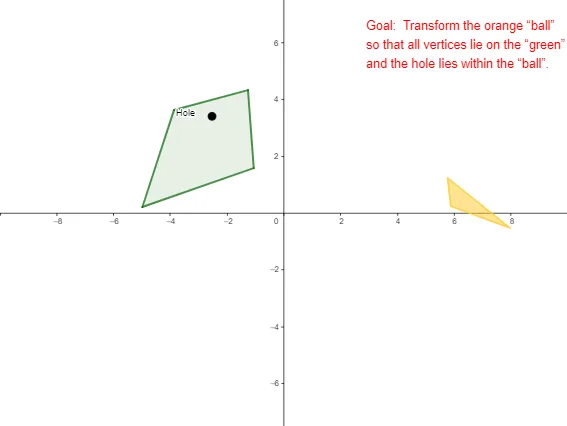
This interactive GeoGebra example, titled 'Transformation Golf Hole 9', is a game-like activity that demonstrates how to use geometric transformations—translation, rotation, and reflection—to move target shapes (such as triangles or rectangles) to a designated goal, similar to playing golf. The core mathematical concepts are the three basic isometries in plane geometry: translation, rotation, and reflection, and their effects on the position and orientation of figures. In terms of construction, the example employs GeoGebra commands such as Vector, Polygon, Vertex, Point, and Line, and includes multiple buttons (TranslateButton, ReflectButton, RotateButton) and sliders (e.g., α) to control transformation animations, along with coordinate range variables (xmin, xmax, ymin, ymax) and zoom objects to adjust the view. It is suitable for middle and high school students learning geometric transformations, and can be used for classroom demonstrations or self-directed exploration, reinforcing understanding of transformation properties through a gamified approach.
GeoGebra Commands & Parameters
Vector(A, B) → uPolygon(OrigPts) → ballVertex(ball) → C, D, EPoint(u) → HVector(A, H) → transPolygon(OrigPts_{old}) → ball_{old}Line(F, G) → fPolygon(I, J, K, L) → green, i, j, k, l
AI Drawing Prompt Reference
Create a golf-like geometric transformation challenge scene. Start with a polygon representing the target ball, and another polygon from its original vertices. Draw a vector from a start point to an end point, place a point on it, and derive a translation vector. Add a line as a reflection axis. Then draw a quadrilateral as the goal area, labeling its sides. Include a slider for rotation angle and three buttons for translation, reflection, and rotation actions. Adjust the view to fit all objects.
The prompt above was compiled from the original drawing commands and is for reference only.