
Magic Wallet: Modular Origami Animation
Loading the math board and drawing, please wait…
In collections
Action Modular Origami
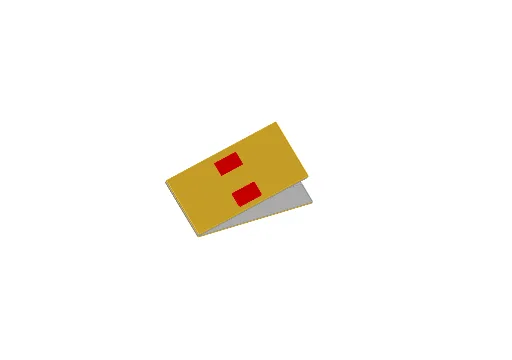
This example demonstrates a 3D animation of a 'Magic Wallet' model folded from paper, simulating the opening and closing of the origami structure through geometric transformations in GeoGebra. The core mathematical concepts include similar triangles, quadrilateral properties, vector translation, rotation, mirror symmetry, and transformations of planes and polyhedra in space, along with a smooth ramp surface and a clock animation linked to the folding angle. Construction highlights: from the summary, commands such as Intersect, Point, Line, OrthogonalLine, Dilate, Midpoint, Polygon, Vector, Translate, Rotate, Mirror, and Plane are used, with auxiliary objects like smoothramp, clock, and a series of primed points and polygons created via transformations, controlled by parameter α. This is suitable for high school to early college geometry and transformation lessons, as well as mathematical modeling of origami art, helping students visualize spatial transformations and dynamic geometry.
GeoGebra Commands & Parameters
Intersect(xAxis, yAxis) → APoint(xAxis) → BPoint(yAxis) → CLine(A, B) → fLine(A, C) → gOrthogonalLine(B, f) → hOrthogonalLine(C, g) → iIntersect(h, i) → DDilate(C, 1 / 3, A) → C'Midpoint(C', C) → EOrthogonalLine(C', g) → jOrthogonalLine(E, g) → kIntersect(h, k) → FIntersect(h, j) → GPolygon(A, B, G, C') → poly1, a, b, g_1, c'Vector(A, C') → uTranslate(A, u) → A'Translate(B, u) → B'Translate(G, u) → G'Translate(C', u) → C''Polygon(A', B', G', C'') → poly1', a', b', g', c''Translate(A', u) → A''Translate(B', u) → B''Translate(G', u) → G''Translate(C'', u) → C'''Polygon(A'', B'', G'', C''') → poly1'', a'', b'', g'', c'''Polygon(A, B, D, C) → polyBack, a_1, b_1, d, cVector((0, 0, (-offset))) → vOffsetTranslate(A, vOffset) → A'_1Translate(B, vOffset) → B'_1Translate(D, vOffset) → D'Translate(C, vOffset) → C'_1Polygon(A'_1, B'_1, D', C'_1) → polyBack0, a'_1, b'_1, d', c'_1Vector((offset, 0, 0)) → vShiftVector(A, B) → vLengthTranslate(polyBack0, Vector[vLength + vShift]) → polyBack1Translate(polyBack0, Vector[(-vLength) - vShift]) → polyBack2Rotate(polyBack1, α, h) → polyBack1'Rotate(polyBack2, α, g) → polyBack2'Rotate({poly1, poly1', poly1''}, 180° + α, h) → listMove1Rotate({poly1, poly1', poly1''}, 180° + α, g) → listMove2Point(g_1) → JPoint(g_1) → KPolygon(H, I, J, K) → poly2, h_1, i_1, j_1, k_1Midpoint(C, A) → LOrthogonalLine(L, c''') → lMirror(H, l) → H'Mirror(I, l) → I'Mirror(J, l) → J'Mirror(K, l) → K'Polygon(H', I', J', K') → poly2', h', i', j', k'Translate(H', Vector[(-vLength)]) → H''Translate(I', Vector[(-vLength)]) → I''Translate(J', Vector[(-vLength)]) → J''Translate(K', Vector[(-vLength)]) → K''Polygon(Rotate[Translate[H'', Vector[(-vShift)]], α, g], Rotate[Translate[I'', Vector[(-vShift)]], α, g], Rotate[Translate[J'', Vector[(-vShift)]], α, g], Rotate[Translate[K'', Vector[(-vShift)]], α, g]) → poly2'', m, n, p, qTranslate(H, Vector[(-vLength)]) → H'_1Translate(I, Vector[(-vLength)]) → I'_1Translate(J, Vector[(-vLength)]) → J'_1Translate(K, Vector[(-vLength)]) → K'_1Polygon(H'_1, I'_1, J'_1, K'_1) → poly2'_1, h'_1, i'_1, j'_1, k'_1OrthogonalLine(L, xOyPlane) → rPoint(r) → MIntersect(l, h) → NPlane(N, L, M) → eMirror(poly2'', e) → poly2'''Translate(H, vOffsetNeg) → H'_2Translate(I, vOffsetNeg) → I'_2Translate(J, vOffsetNeg) → J'_2Translate(K, vOffsetNeg) → K'_2Polygon(H'_2, I'_2, J'_2, K'_2) → poly2'_2, h'_2, i'_2, j'_2, k'_2Mirror(poly2'_2, e) → poly3
AI Drawing Prompt Reference
Create a 3D origami animation of a magic wallet that opens and closes. Start with a quadrilateral base formed by two right triangles, then duplicate this shape upward three times to create layered paper folds. Add two slanted support planes on either side, rotating them around the base edges to simulate the wallet's motion. All layers rotate symmetrically during the opening and closing. Include a slider to control the folding angle and a clock to display the angle. Use smooth surfaces and clear lines to emphasize geometric transformations.
The prompt above was compiled from the original drawing commands and is for reference only.