
Animation of Circle and Tangent Line
Loading the math board and drawing, please wait…
In collections
Circle - Area & Circumference
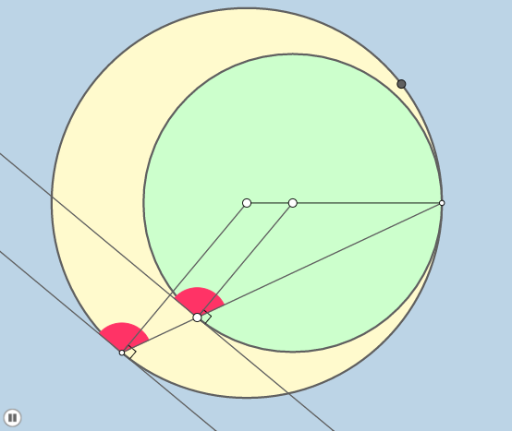
This example demonstrates the relationship between a circle and a tangent line. Key mathematical concepts include circles, tangent lines, and reflections. Using GeoGebra commands such as Circle, Tangent, Angle, and Dilate, the interaction between a point on the circle and the tangent line is dynamically illustrated. Suitable for high school mathematics education, particularly in coordinate geometry and calculus courses.
GeoGebra Commands & Parameters
Circle(A, B) → cSegment(A, B) → fSegment(A, C) → gPoint(g) → DCircle(D, C) → dPoint(d) → ELine(D, E) → hOrthogonalLine(E, h) → iLine(C, E) → jIntersect(c, j, 2) → FTangent(F, c) → k,Segment(A, F) → lSegment(D, E) → mCircle(E, a) → eCircle(F, a) → pIntersect(p, k) → G, HIntersect(e, i) → I, JIntersect(p, l, 1) → KIntersect(e, m, 1) → LAngle(G, F, K) → αAngle(J, E, L) → βIntersect(e, j, 1) → MIntersect(p, j, 1) → NCircleSector(E, M, I) → qDilate(D, If[0 < b ≤ 1, 1 - b, 0], E) → D'Segment(D, D') → nDilate(A, If[1 < b ≤ 2, 2 - b, 0], F) → A'Segment(A, A') → rAngle(M, E, I) → γRotate(M, If[4 < b ≤ 5, ((b - 4) * γ), γ], E) → M'CircleSector(E, M, M') → sDilate(E, If[5.5 < b ≤ 6.5, 6.5 - b, 0], F) → E'Vector(E, E') → uDilate(C, If[2 < b ≤ 3, 3 - b, 0], E) → C'Segment(C, C') → tDilate(E, If[3 < b ≤ 4, 4 - b, 0], F) → E'_1Segment(E, E'_1) → f_1Translate(q, u) → s'
AI Drawing Prompt Reference
Draw a circle with a tangent line at a point on the circle. From a point on the tangent, construct a perpendicular line. Connect the circle center to the tangency point. At the tangency point, create two small circles of equal radius intersecting the tangent and the perpendicular. Use a slider to animate: the tangency point moves along the circle, the tangent updates, and segments from the center and tangent point are shown. Also display sectors formed by these points and a translated sector via a vector, all dynamically scaled by the slider.
The prompt above was compiled from the original drawing commands and is for reference only.