
Animation 66: Circle and Equilateral Triangle Optimization
Loading the math board and drawing, please wait…
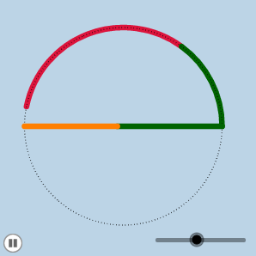
This example demonstrates the relationship between an inscribed circle in an equilateral triangle and a rotating cone through animation. Core math concepts include circle, equilateral triangle, optimization problems, solid geometry, and algebra. GeoGebra commands like Center, Segment, Rotate, Angle, CircleArc, and Dilate are used in construction. Suitable for high school and above students to understand geometric constructions and optimization problems.
GeoGebra Commands & Parameters
Center(c) → ASegment(C, B) → bRotate(B, 114.59155902616465°, A) → B'Angle(B, A, B') → αRotate(B', 114.59155902616465°, A) → B''Angle(B', A, B'') → βRotate(B'', 114.59155902616465°, A) → B'''Angle(B'', A, B''') → γRotate(B, If[0 < d < 1, (d * α), α], A) → B'_1CircleArc(A, B, B'_1) → eDilate(C, If[0 < d < 1, 1 - d, 0], B) → C'Segment(C', B) → fSegment(C', C) → gRotate(e, If[1.2 ≤ d ≤ 2.2, ((d - 1.2) * α), α], A) → e'Dilate(C, If[1.2 < d < 2.2, 2.2 - d, 0], B) → C'_1Segment(C'_1, B) → hSegment(C, C'_1) → iRotate(B, If[1.2 < d < 2.2, ((d - 1.2) * α), α], A) → B'_2CircleArc(A, B, B'_2) → kDilate(C, If[2.4 < d < 3.4, 3.4 - d, 0], B) → C'_2Segment(C'_2, B) → jSegment(C, C'_2) → lRotate(B, If[2.4 < d < 3.4, ((d - 2.4) * α), α], A) → B'_3CircleArc(A, B, B'_3) → pRotate(e', If[2.4 ≤ d ≤ 3.4, ((d - 2.4) * α), α], A) → e''Rotate(k, If[2.4 ≤ d ≤ 3.4, ((d - 2.4) * α), α], A) → k'CircleArc(A, B, B') → qCircleArc(A, B''', B) → rCircleArc(A, B, B') → sCircleArc(A, B', B'') → tCircleArc(A, B'', B''') → c_1CircleArc(A, B''', B) → d_1
AI Drawing Prompt Reference
Draw an equilateral triangle with an inscribed circle centered at its center. From the center, draw radii to each of the three vertices, creating three equal central angles. Using an animation slider, rotate these radii sequentially to generate dynamic arcs, while the triangle vertices move inward along the sides, forming a shrinking triangle with rotating arcs. The overall figure includes the circle, the equilateral triangle, rotating radii, arcs, and dynamically changing side lengths, illustrating the geometric relationship between the circle and triangle during an optimization process.
The prompt above was compiled from the original drawing commands and is for reference only.