
Animation 276: Geometric Transformations and Circle Properties
Loading the math board and drawing, please wait…
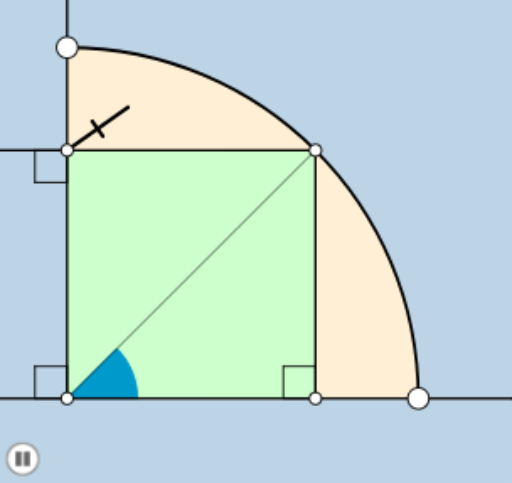
This example demonstrates dynamic changes in points, lines, and circles under transformations like rotation, translation, and dilation through animation, visually showcasing symmetry in geometric figures and properties of circumcircles. Core mathematical concepts include angles, ratios, translation, exponentiation, circumcircle, and complex numbers. Construction highlights from the summary involve commands/objects such as Circle, Rotate, Angle, Line, Intersect, Ray, Segment, CircleSector, CircleArc, Dilate, Point, and Polygon in GeoGebra. Suitable for high school and above, it serves as a teaching demonstration or exploration tool for understanding geometric transformations, circle properties, and applications of complex numbers in geometry.
GeoGebra Commands & Parameters
Circle(A, B) → cRotate(B, 45°, A) → B'Angle(B, A, B') → αLine(B', f) → hLine(B', g) → iIntersect(f, xAxis) → DIntersect(i, f) → EIntersect(g, h) → FLine(F, B) → jAngle(B, F, B') → βRotate(B', β, F) → B''Angle(B', F, B'') → γRay(F, B'') → kIntersect(c, k, 1) → GSegment(F, G) → lCircle(F, (0.5 * l)) → dIntersect(d, l, 1) → HIntersect(d, h, 2) → ICircleSector(F, I, H) → eCircle(A, (0.2 * a)) → pRay(A, B') → mIntersect(p, g) → J, KIntersect(p, f) → L, MIntersect(p, m, 1) → NCircleSector(A, N, J) → qAngle(C, A, O) → δAngle(B', E, O) → εRay(A, O) → nCircleArc(A, B, C) → rRay(A, B) → sRay(A, C) → tDilate(A, If[0 < o ≤ 1, 1 - o, 0], B') → A'Segment(A, A') → f_1Point(h) → PAngle(P, F, A) → ηRay(F, P) → g_1Dilate(B', If[1 < o ≤ 2, 2 - o, 0], E) → B''_1Dilate(B', If[1 < o ≤ 2, 2 - o, 0], F) → B''_2Segment(B', B''_1) → h_1Segment(B', B''_2) → i_1Rotate(q, If[2 < o ≤ 3, ((-(o - 2)) * π / 4), ((-π)) / 4], A) → q'Circle(F, l) → c_1Intersect(c_1, j, 2) → QCircle(Q, l) → d_1Intersect(d_1, j, 2) → RDilate(F, If[3 < o ≤ 4, 4 - o, 0], G) → F'Segment(F, F') → j_1Dilate(F, If[4 < o < 5, 5 - o, 0], Q) → F'_1Segment(F, F'_1) → k_1Dilate(Q, If[5 < o < 6, 6 - o, 0], R) → Q'Segment(Q, Q') → l_1Dilate(R, If[6 < o < 7, 7 - o, 0], B) → R'Segment(R, R') → m_1Rotate(e, If[7 < o ≤ 8, ((-(o - 7)) * β), (-β)], F) → e'Rotate(F, If[8 < o ≤ 9, (((-(o - 8)) * 2) * β), (-2 * β)], F) → F'_2Rotate(F', If[8 < o ≤ 9, (((-(o - 8)) * 2) * β), (-2 * β)], F) → F''Segment(F'_2, F'') → n_1Rotate(F'_2, If[9 < o ≤ 10, ((-(o - 9)) * π), (-π)], F'') → SRotate(F'', If[9 < o ≤ 10, ((-(o - 9)) * π), (-π)], F'') → F'''Segment(S, F''') → p_1Rotate(S, If[10 < o ≤ 11, ((-(o - 10)) * π), (-π)], S) → S'Rotate(F''', If[10 < o ≤ 11, ((-(o - 10)) * π), (-π)], S) → TSegment(S', T) → q_1Ray(A, U) → r_1CircleSector(A, B, C) → e_1Polygon(A, E, B', F) → poly1, a_1, e_2, b', f_2
AI Drawing Prompt Reference
Draw a circle c, then rotate point B 45 degrees around point A to get B', and draw the angle α between B' and A, as well as two lines h and i through B'. Use the intersections of these lines with the axes to construct new shapes, including segments, arcs, and rays. Finally, apply transformations like rotation, translation, and dilation to create a series of dynamic shapes, demonstrating geometric transformations and circle properties.
The prompt above was compiled from the original drawing commands and is for reference only.