
Animation 13: Geometric Mean and Similar Triangles Dynamic Construction
Loading the math board and drawing, please wait…
In collections
Similarity & Right Triangle Trigonometry
Similarity, Right Triangles, and Trigonometry (SRT) Cluster
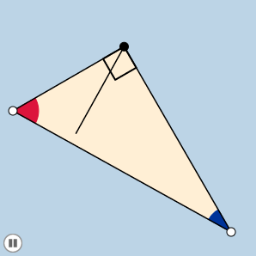
This GeoGebra example presents an animated construction that visualizes the geometric mean in right triangles, similar triangles, and conditional probability through dynamic transformations. The core mathematical concepts include the geometric mean theorem (where the altitude to the hypotenuse is the geometric mean of the two segments), similarity of right triangles formed by perpendiculars, and conditional probability possibly represented by area ratios. The construction uses a rich set of GeoGebra commands: Semicircle, Point, Segment, Min, Midpoint, OrthogonalLine, Circle, Intersect, Angle, Polygon, CircleSector, Dilate, Vector, Translate, CircleArc, Rotate, involving objects such as B, A, d, C, f, e, a, m, l, n, C_1, b, c, g, E, h, α, β, poly1, d_1, a_1, e_1, poly2, d_2, e_2, b_1, k, i, p, q, F, G, H, I, J, K, L, M, N, r. It is ideal for high school or undergraduate students to explore geometric mean relationships, similarity criteria, and how transformations (dilation, rotation, translation) affect geometric properties. The animation likely uses sliders to vary parameters, making it suitable for interactive classroom demonstrations or self-study.
GeoGebra Commands & Parameters
Semicircle(A, B) → dPoint(d) → CSegment(C, B) → fSegment(A, C) → eSegment(A, B) → aMin(a, f) → mMin(a, e) → lMin(l, m) → nMidpoint(a) → C_1OrthogonalLine(C_1, a) → bCircle(C_1, A) → cOrthogonalLine(C, a) → gIntersect(g, a) → ESegment(C, E) → hAngle(B, E, C) → αAngle(A, C, B) → βPolygon(A, E, C) → poly1, d_1, a_1, e_1Polygon(E, B, C) → poly2, d_2, e_2, b_1Circle(A, (0.2 * n)) → kCircle(C, (0.2 * n)) → pCircle(B, (0.2 * n)) → qIntersect(p, e_1, 1) → FIntersect(a_1, b_1) → GIntersect(a_1, b_1) → HIntersect(p, h, 1) → IIntersect(p, f, 1) → JIntersect(q, a, 1) → KIntersect(q, f, 1) → LIntersect(k, a, 1) → MIntersect(k, e, 1) → NCircleSector(A, M, N) → rDilate(C, If[-2 < i < -1, -1 - i, 0], E) → D'Segment(C, D') → jCircleSector(B, L, K) → tAngle(C, E, A) → γDilate(A, If[-0.5 < i ≤ 0.5, 0.5 - i, 0], C) → A'Vector(A, A') → uTranslate(r, u) → r'CircleArc(A, M, N) → f_1Dilate(B, If[1.5 < i ≤ 2.5, 2.5 - i, 0], C) → B'Vector(B, B') → vTranslate(t, v) → t'CircleArc(B, L, K) → g_1Polygon(A, B, C) → poly3, d_3, a_2, b_2Rotate(r', If[0.5 < i ≤ 1.5, ((-(i - 0.5)) * π / 2), -1.5707963267948966], C) → r''Translate(t, v) → t'_1Rotate(t'_1, If[2.5 < i ≤ 3.5, (((i - 2.5) * 90))°, 90°], C) → s
AI Drawing Prompt Reference
Draw a semicircle with a fixed diameter. Place a moving point on the arc, connecting it to both endpoints to form a right triangle. Drop a perpendicular from the moving point to the diameter, dividing it into two segments; the altitude is the geometric mean of these segments. Construct small circles centered at the triangle's vertices, mark intersection points on sides, and create circular sectors and arcs. Use a slider to rotate or translate parts of the figure, dynamically illustrating similar triangles and the geometric mean property.
The prompt above was compiled from the original drawing commands and is for reference only.