
Animated Surface Area and Volume of Cylinder
Loading the math board and drawing, please wait…
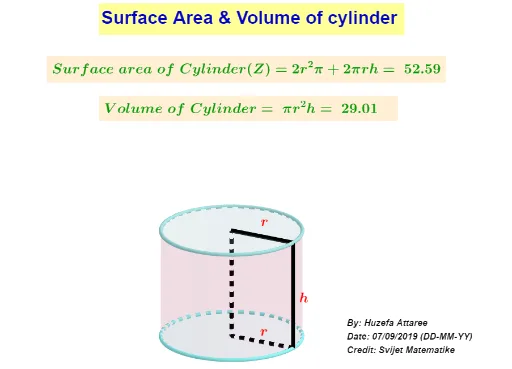
This example demonstrates the surface area and volume of a cylinder through animation. It involves core math concepts like area, volume, rotation, ratios, geometric transformations, exponential functions, and percentages. The construction uses GeoGebra commands and objects such as Intersect, Circle, Cylinder, Segment, Line, Midpoint, and Textfield. Suitable for high school students learning solid geometry to visually understand the formulas for surface area and volume.
GeoGebra Commands & Parameters
Intersect(xAxis, yAxis) → ACircle(A, r) → cCylinder(c, h) → e, f, gIntersect(c, xAxis, 2) → BSegment(A, B) → iLine(B, zAxis) → jIntersect(j, f) → C,Line(C, xAxis) → kLine(A, j) → lIntersect(l, k) → DSegment(A, B) → mSegment(D, A) → nSegment(D, C) → pSegment(B, C) → qMidpoint(p) → EMidpoint(q) → FMidpoint(m) → GTextfield(h) → InputBox2Textfield(r) → InputBox1
AI Drawing Prompt Reference
Draw an animated cylinder to demonstrate its surface area and volume. The cylinder is generated by rotating a circle around its center, with the radius and center labeled. Show the coordinate axes, and draw line segments connecting the intersection points of the circle with the x-axis to the origin, and from the origin to the z-axis. Find the intersection points of the vertical line with the cylinder's side, and connect these points to form a triangle with the origin and the other intersection point. Calculate and label the midpoints of the triangle's sides, and use input boxes for the cylinder's height and radius to display the calculations for surface area and volume.
The prompt above was compiled from the original drawing commands and is for reference only.