
Unit Circle: Showing Coordinates of Certain Points by Huzefa
Loading the math board and drawing, please wait…
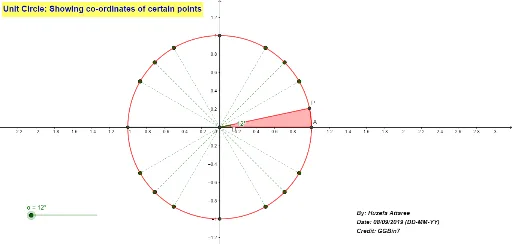
This example dynamically demonstrates the coordinates of specific points on a unit circle, involving core math concepts like unit circle, Pythagorean theorem, trigonometric functions, vectors, and coordinate geometry. It uses GeoGebra commands such as Intersect, Circle, Rotate, Sequence, Segment, Angle, and CircleSector for construction, making it suitable for high school and above learners to understand the connection between trigonometry and coordinate geometry.
GeoGebra Commands & Parameters
Intersect(xAxis, yAxis) → OCircle(O, 1) → cRotate(A, α, O) → PSequence(Rotate[A, ((90 * k) + 30)°, O], k, 0, 3) → l1Sequence(Rotate[A, ((90 * k) + 45)°, O], k, 0, 3) → l2Sequence(Rotate[A, ((90 * k) + 60)°, O], k, 0, 3) → l3Segment(A, C) → fSegment(B, D) → gSequence(Segment[O, Element[l1, k]], k, 1, 4) → l4Sequence(Segment[O, Element[l2, k]], k, 1, 4) → l5Sequence(Segment[O, Element[l3, k]], k, 1, 4) → l6Angle(A, O, P) → βCircleSector(O, A, P) → d