
Unit Circle: Showing Coordinates of Certain Points
Loading the math board and drawing, please wait…
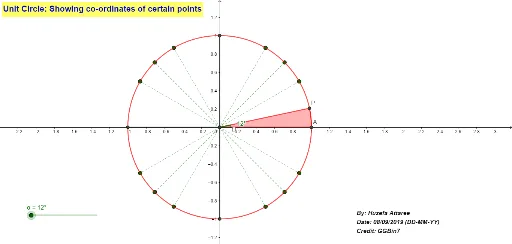
This example dynamically demonstrates the coordinates of specific points on a unit circle, visually illustrating the relationship between coordinates and trigonometric functions. Core math concepts include the unit circle, coordinate geometry, trigonometry, and angles. It uses GeoGebra commands like Intersect, Circle, Rotate, Sequence, Segment, Angle, and CircleSector. Suitable for high school mathematics teaching to understand trigonometric definitions and coordinate geometry applications.
GeoGebra Commands & Parameters
Intersect(xAxis, yAxis) → OCircle(O, 1) → cRotate(A, α, O) → PSequence(Rotate[A, ((90 * k) + 30)°, O], k, 0, 3) → l1Sequence(Rotate[A, ((90 * k) + 45)°, O], k, 0, 3) → l2Sequence(Rotate[A, ((90 * k) + 60)°, O], k, 0, 3) → l3Segment(A, C) → fSegment(B, D) → gSequence(Segment[O, Element[l1, k]], k, 1, 4) → l4Sequence(Segment[O, Element[l2, k]], k, 1, 4) → l5Sequence(Segment[O, Element[l3, k]], k, 1, 4) → l6Angle(A, O, P) → βCircleSector(O, A, P) → d
AI Drawing Prompt Reference
Draw a unit circle centered at the origin with radius 1. Place a movable point on the circle and display its coordinates. Draw a radius segment from the center to this point, and mark the angle between this radius and the positive x-axis. On the circle, take points at starting angles of 30, 45, and 60 degrees, each repeated every 90 degrees, giving twelve points total. Draw radius segments from the center to each of these points. Additionally, select two pairs of specific points on the circle and connect each pair with a line segment, forming two chords. Finally, fill a sector from the positive x-axis to the movable point's radius, and label the angle of this sector.
The prompt above was compiled from the original drawing commands and is for reference only.