
Angles on Rays
Loading the math board and drawing, please wait…
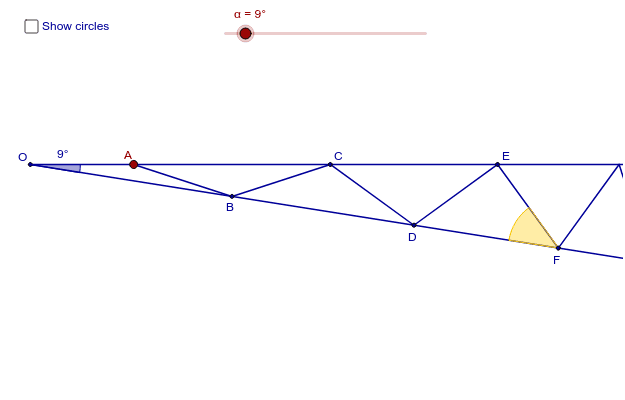
This example demonstrates angles on rays. Key mathematical concepts include angle measurement and rotation. Using GeoGebra commands such as Intersect, Point, Rotate, Ray, etc., a series of angles can be constructed. Suitable for middle school and above students to learn geometry and trigonometry.
GeoGebra Commands & Parameters
Intersect(xAxis, yAxis) → OPoint(xAxis) → VRotate(V, (-α), O) → V'Ray(O, V) → aRay(O, V') → bPoint(a) → ACircle(O, A) → cCircle(A, O) → dIntersect(d, b) → B', BCircle(B, A) → eIntersect(e, a) → C', CCircle(C, B) → fIntersect(f, b) → D', DCircle(D, C) → gIntersect(g, a) → E', ECircle(E, D) → hIntersect(h, b) → F', FCircle(F, E) → kIntersect(k, a) → G', GCircle(G, F) → pIntersect(p, b) → H', HCircle(H, G) → qIntersect(q, a) → I', ICircle(I, H) → rIntersect(r, b) → J', JSegment(J, I) → iSegment(I, H) → jSegment(H, G) → lSegment(G, F) → mSegment(F, E) → nSegment(E, D) → sSegment(D, C) → tSegment(C, B) → a_1Segment(A, B) → b_1Angle(E, F, D) → βAngle(B, O, A) → γ
AI Drawing Prompt Reference
Draw two intersecting rays, then rotate one ray around the intersection point to form a series of intersecting circles and arcs. Start by taking point O on the x-axis as the rotation center, then take point V on the x-axis as the endpoint of the initial ray. Rotate V to get V', and draw two rays a and b starting from O and V' respectively. Then draw circles c, d, etc., using intersection points to form a series of arcs, and finally connect the endpoints of these arcs to form a polygon. Measure angles β and γ.
The prompt above was compiled from the original drawing commands and is for reference only.