
Angles in Tangram
Loading the math board and drawing, please wait…
In collections
MateTangram
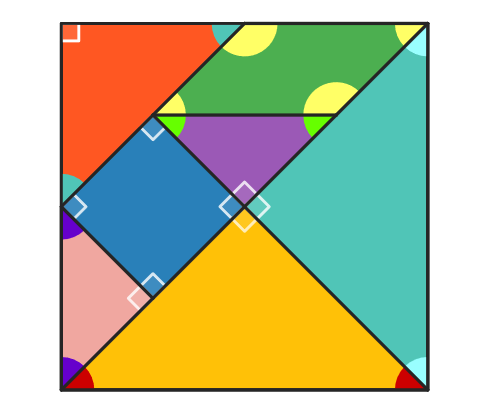
This example explores the measures of angles in the Tangram pieces. Key mathematical concepts include geometry, isosceles triangles, parallelograms, right triangles, and squares. Commands used include Polygon, Segment, Midpoint, Line, Intersect, Rotate, and InteriorAngles. Suitable for high-grade elementary to junior high school students to learn about geometric shapes and angles.
GeoGebra Commands & Parameters
Polygon(A, B, 4) → poli1, frame3, frame4, frame1, frame2, C, DSegment(A, C) → frame12Midpoint(D, C) → EMidpoint(D, A) → FSegment(F, E) → frame5Midpoint(A, C) → GSegment(B, G) → frame9Midpoint(F, E) → HMidpoint(G, C) → ISegment(H, I) → frame7Segment(G, H) → frame8Line(F, frame8) → jIntersect(j, frame12) → JSegment(F, J) → frame11Polygon(A, G, B) → poli2, b_1, a_1, g_1Rotate(O + (a_1, 0), Angle[B - G] + Angle[O - N] - Angle[G - A], O) → PPolygon(N, O, P) → poli4, p, n, oPolygon(B, G, C) → poli3, c_1, b_2, g_2Rotate(L + (b_2, 0), Angle[C - G] + Angle[L - K] - Angle[G - B], L) → MPolygon(K, L, M) → poli5, m, k_1, lPolygon(H, E, C, I) → poli6, h_1, e_1, c_2, i_1Rotate(R + (e_1, 0), Angle[C - E] + Angle[R - Q] - Angle[E - H], R) → SRotate(S + (c_2, 0), Angle[I - C] + Angle[S - R] - Angle[C - E], S) → TPolygon(Q, R, S, T) → poli7, q, r, s, tPolygon(H, G, I) → poli8, i_2, h_2, g_3Rotate(V + (h_2, 0), Angle[I - G] + Angle[V - U] - Angle[G - H], V) → WPolygon(U, V, W) → poli9, w, u, vPolygon(F, H, G, J) → poli10, f_1, h_3, g_4, j_1Rotate(A_1 + (h_3, 0), Angle[G - H] + Angle[A_1 - Z] - Angle[H - F], A_1) → B_1Rotate(B_1 + (g_4, 0), Angle[J - G] + Angle[B_1 - A_1] - Angle[G - H], B_1) → C_1Polygon(Z, A_1, B_1, C_1) → poli11, z, a_2, b_3, c_3Polygon(F, J, A) → poli12, a_3, f_2, j_2Rotate(E_1 + (f_2, 0), Angle[A - J] + Angle[E_1 - D_1] - Angle[J - F], E_1) → F_1Polygon(D_1, E_1, F_1) → poli13, f_3, d_1, e_2Polygon(F, D, E) → poli14, e_3, f_4, d_2Rotate(H_1 + (f_4, 0), Angle[E - D] + Angle[H_1 - G_1] - Angle[D - F], H_1) → I_1Polygon(G_1, H_1, I_1) → poli15, i_3, g_5, h_4InteriorAngles(poli7) → parA, parB, parC, parDInteriorAngles(poli11) → quaA, quaB, quaC, quaDInteriorAngles(poli5) → triGA, triGB, triGCInteriorAngles(poli4) → triVA, triVB, triVCInteriorAngles(poli15) → triAA, triAB, triACInteriorAngles(poli9) → triRA, triRB, triRCInteriorAngles(poli13) → triPUC, triPUA, triPUB
AI Drawing Prompt Reference
Draw a tangram-style angle study figure made of several connected polygons on the same plane. Start by constructing an outer outline using a few triangles and quadrilaterals sharing common points. Then take midpoints of selected sides, connect the relevant midpoint-to-midpoint pairs with segments to create internal subdivisions. Next, repeatedly rotate the small polygon pieces around specified centers so that they align into distinct triangular and quadrilateral regions, forming one larger connected quadrilateral area as well. Finish by labeling the interior angle measures for each of the resulting quadrilaterals and triangles, so the angles can be compared.
The prompt above was compiled from the original drawing commands and is for reference only.