
Angles Between Two Lines and a Transversal
Loading the math board and drawing, please wait…
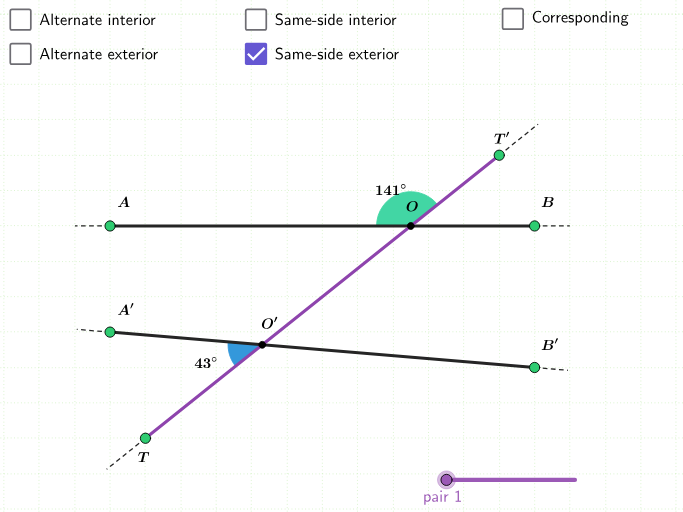
This example explores the angles formed by lines cut by a transversal. When lines are parallel, properties are displayed. Using GeoGebra commands like Point, Line, Intersect, and Angle allows for interactive exploration and practice. Suitable for middle school students or educational purposes.
GeoGebra Commands & Parameters
Point(Segment[(5, -1), (5, 5)]) → APoint(Segment[(17, -1), (17, 5)]) → BLine(A, B) → aPoint(Segment[(5, -1), (5, y(A))]) → CPoint(Segment[(17, -1), (17, y(B))]) → DLine(C, D) → bPoint(Segment[(6, -2), (16, -2)]) → FPoint(Segment[(6, 6), (16, 6)]) → ELine(E, F) → cIntersect(a, c) → GIntersect(b, c) → HAngle(B, G, E) → αAngle(E, G, A) → βAngle(A, G, H) → γAngle(H, G, B) → δAngle(D, H, G) → εAngle(G, H, C) → ζAngle(C, H, F) → ηAngle(F, H, D) → θSegment(A, B) → dSegment(C, D) → eSegment(E, F) → fPoint(a) → IPoint(b) → JPoint(c) → KPoint(c) → LSegment(E, K) → gSegment(A, I) → hSegment(C, J) → iSegment(F, L) → jPoint(a) → MPoint(b) → NSegment(B, M) → kSegment(D, N) → lAreParallel(d, e) → parLin
AI Drawing Prompt Reference
Draw two vertical lines, one on the left and one on the right, then a horizontal line crossing both, creating two intersection points. On each vertical line, place two points, one above and one below the horizontal line, and connect them to form two segments that intersect the horizontal line. Label the eight angles at the two intersections of the vertical lines with the horizontal line, and the four angles formed by the vertical lines and the horizontal line. On each segment, place a point and connect it to adjacent endpoints to create additional segments. Finally, check if the two vertical lines are parallel, and if so, display the angle properties.
The prompt above was compiled from the original drawing commands and is for reference only.