
Angle Sum of Triangle on a Sphere
Loading the math board and drawing, please wait…
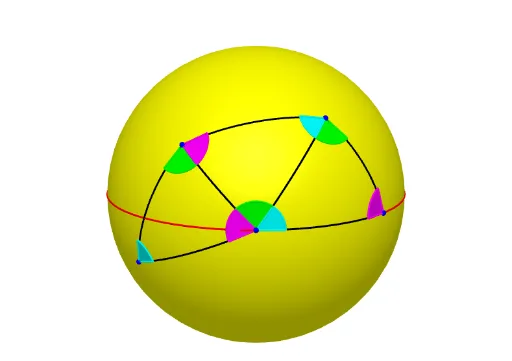
This example demonstrates the angle sum property of a spherical triangle. It involves core mathematical concepts like spherical geometry, angle measurement, and non-Euclidean geometry. Construction highlights include using GeoGebra commands such as Intersect, Sphere, IntersectPath, Point, CircleArc, Midpoint, Line, etc., to draw and calculate the angle sum. Suitable for high school students and geometry enthusiasts studying spherical geometry properties.
GeoGebra Commands & Parameters
Intersect(zAxis, xAxis) → ASphere(A, 1) → aIntersect(xAxis, a, 2) → BIntersectPath(xOyPlane, a) → cPoint(c) → CPointIn(a) → DCircleArc(A, B, D) → dCircleArc(A, C, D) → eIntersect(xAxis, d, 1) → ECircleArc(A, E, C) → fMidpoint(D, E) → FLine(A, F) → gIf(0 ≤ n < 1, Rotate[D, (n * π), g], B) → GIf(0 ≤ n < 1, Rotate[B, (n * π), g], D) → HIf(0 ≤ n < 1, Rotate[C, (n * π), g], Rotate[C, π, g]) → ICircleArc(A, G, H) → hCircleArc(A, G, I) → kCircleArc(A, H, I) → pMidpoint(D, C) → JMidpoint(I, E) → KPlane(K, J, A) → bOrthogonalLine(A, b) → iIf(2 ≤ n < 3, Rotate[e, ((-(n - 2)) * Angle[K, A, J]), i], k) → qIf(2 ≤ n < 3, Rotate[D, ((-(n - 2)) * Angle[J, A, K]), i], Rotate[D, (-Angle[J, A, K]), i]) → LIf(2 ≤ n < 3, Rotate[C, ((-(n - 2)) * Angle[J, A, K]), i], Rotate[C, (-Angle[J, A, K]), i]) → MIf(2 ≤ n < 3, Rotate[B, ((-(n - 2)) * Angle[J, A, K]), i], Rotate[B, (-Angle[J, A, K]), i]) → NCircleArc(A, L, N) → rCircleArc(A, M, N) → sLine(A, D) → jLine(A, C) → lOrthogonalPlane(D, j) → mPlane(D, A, E) → oPlane(D, A, C) → tIntersectPath(t, m) → f_1IntersectPath(o, m) → g_1Circle(D, 0.2, j) → c_1Intersect(g_1, c_1) → O, PIntersect(f_1, c_1) → Q, RCircleSector(D, P, R) → d_1If(0 ≤ n < 1, Rotate[d_1, (n * π), g], Rotate[d_1, π, g]) → e_1If(2 ≤ n < 3, Rotate[d_1, ((-(n - 2)) * Angle[J, A, K]), i], Rotate[d_1, (-Angle[J, A, K]), i]) → h_1OrthogonalPlane(E, xAxis) → uIntersectPath(o, u) → i_1IntersectPath(xOyPlane, u) → j_1Circle(E, 0.2, xAxis) → k_1Intersect(i_1, k_1) → S, TIntersect(j_1, k_1) → U, VCircleSector(E, S, U) → p_1If(0 ≤ n < 1, Rotate[p_1, (n * π), g], Rotate[p_1, π, g]) → q_1If(2 ≤ n < 3, Rotate[p_1, ((-(n - 2)) * Angle[J, A, K]), i], Rotate[p_1, (-Angle[J, A, K]), i]) → r_1Plane(A, D, C) → vOrthogonalPlane(C, l) → wIntersectPath(v, w) → l_1IntersectPath(w, xOyPlane) → m_1Circle(C, 0.2, l) → s_1Intersect(l_1, s_1) → W, ZIntersect(m_1, s_1) → A_1, B_1CircleSector(C, Z, A_1) → t_1If(0 ≤ n < 1, Rotate[t_1, (n * π), g], Rotate[t_1, π, g]) → c_2If(2 ≤ n < 3, Rotate[t_1, ((-(n - 2)) * Angle[J, A, K]), i], Rotate[t_1, (-Angle[J, A, K]), i]) → d_2
AI Drawing Prompt Reference
Draw a spherical triangle on a sphere to demonstrate the property that the sum of its interior angles exceeds 180 degrees. Start by sketching the equator and a meridian to define the triangle's vertices on the sphere's surface. Connect these points to form the spherical triangle, then draw arcs for each interior angle. Use rotations and auxiliary lines to indicate the measurement of the angle sum, highlighting it with differently colored arcs to visually show the difference between spherical and Euclidean geometry.
The prompt above was compiled from the original drawing commands and is for reference only.