
Angle Pairs: Constructing and Visualizing Corresponding Angles
Loading the math board and drawing, please wait…
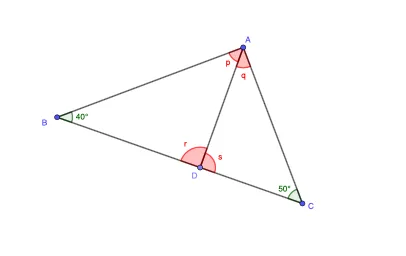
This example demonstrates how to construct and compare “paired angles” within a single interactive geometry figure, allowing learners to visually inspect how angle measures correspond under given constructions. The key mathematical ideas include geometric construction, defining angles from segments and intersection points, measuring/annotating angle values, and using geometric constraints so that multiple angle objects maintain consistent relationships. Construction highlights: using GeoGebra commands Segment (to create edges), Point (to place key vertices), Polygon (to form an outlining shape that organizes edges), and Angle (to generate angle objects at vertices). The setup includes many geometric objects such as points (A, B, C, D, …), polygonal connections, and angle-related variables/annotations (e.g., β and other angle values like r, q, s, ζ) so that multiple angle pairs can be formed and examined together. Suitable for middle-school to early high-school geometry lessons, classroom demonstrations, and interactive practice on angle relationships and geometric drawing.
GeoGebra Commands & Parameters
Segment(A, B) → fSegment(B, C) → gSegment(C, A) → hPoint(g) → DSegment(A, D) → iPolygon(A, B, D) → t1, d, a, bPolygon(A, D, C) → t2, c, a_1, d_1Angle(t1) → p, β, rAngle(t2) → q, s, ζ
AI Drawing Prompt Reference
Draw a triangle using three line segments. Select a point on two of the segments and connect each point to the third vertex of the triangle, creating two intersecting angles. Measure and label the sizes of these angles to visualize their correspondence. Use the polygon tool to connect the segments and intersection points, forming a closed shape to clearly observe and compare the angle relationships.
The prompt above was compiled from the original drawing commands and is for reference only.