
GeoGebra Direct Measurement Example: Polygon Construction and Area Calculation
Loading the math board and drawing, please wait…
In collections
Realidades de GeoGebra
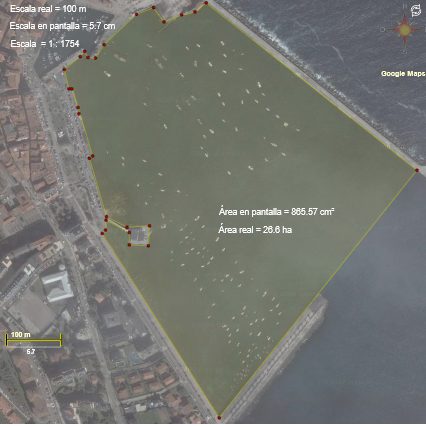
This example demonstrates direct measurement in GeoGebra. It first uses the Segment command to construct the sides of a polygon by connecting points, then applies the Polygon command to create a closed polygon from points O, P_4, P_2, P_3, etc. The construction summary shows various geometric objects including points D and E. This范例 illustrates the core workflow of basic geometric construction: points → segments → polygons. Users can directly obtain measurement results such as area and perimeter through GeoGebra's measurement tools. Ideal for middle school math teachers demonstrating polygon construction or students practicing geometric drawing and measurement skills.
GeoGebra Commands & Parameters
Segment(D, E) → m_2Polygon(O, P_4, K, L, M, N, P, Q, S, T, U, V, P_3, W, Y, Z, A_1, B_1, C_1, D_1, E_1, F, G, H, P_2, F_1, I, J) → POL, o, j, k, l, m, n, p, q, s, t, u, p_4, v, w, y, z, a_1, b_1, c_1, d_1, e_1, p_3, f, g, h, p_2, f_1, i
AI Drawing Prompt Reference
Draw a polygon formed by connecting multiple points. The points include O, P_4, P_2, P_3, etc., connected in order to form a closed shape. The polygon includes points D and E. You can directly measure the area and perimeter using GeoGebra's tools.
The prompt above was compiled from the original drawing commands and is for reference only.