
Deltoid Area Formula Calculation and Verification
Loading the math board and drawing, please wait…
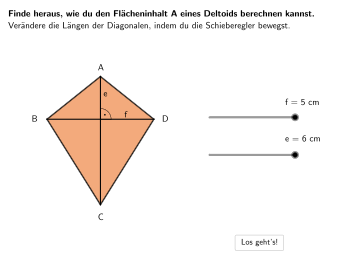
This GeoGebra example demonstrates the deltoid (kite) area formula A=(e×f)/2, showing the relationship between diagonal lengths and area. Construction uses: Polygon for the quadrilateral, Segment for diagonals, Circle for auxiliary construction showing perpendicular bisecting diagonals, Angle to verify right angles, Text for formula display. Includes three interactive tasks: ①multiple-choice formula verification; ②error analysis and correction; ③geometric explanation of the formula. Suitable for grades 5-6 students learning area calculations of special quadrilaterals, developing geometric intuition and formula application skills.
GeoGebra Commands & Parameters
SelectedIndex(DropDown2) → index2Circle(Tri1M, Length[Segment[A, M]]) → HelperKreis4Point(HelperKreis4) → Tri1AnchorRotate(Tri1Anchor, 90°, Tri1M) → I'Spline({M, I, H}, 3) → aCircle(Tri4M, Length[Segment[A, M]]) → HelperKreis1Circle(Tri2M, Length[Segment[C, M]]) → HelperKreis2Circle(Tri3M, Length[Segment[C, M]]) → HelperKreis3Point(HelperKreis2) → Tri2AnchorPoint(HelperKreis3) → Tri3AnchorPoint(HelperKreis1) → Tri4AnchorRotate(Tri4Anchor, -90°, Tri4M) → L'Angle(Tri4Anchor, Tri4M, L') → αAngle(Tri1Anchor, Tri1M, I') → βRotate(Tri2Anchor, -90°, Tri2M) → J'Angle(J', Tri2M, Tri2Anchor) → γRotate(Tri3Anchor, 90°, Tri3M) → K'Angle(Tri3Anchor, Tri3M, K') → δPolygon(Tri2E, Tri2M, Tri2Anchor) → d1, j, o, gPolygon(Tri1E, Tri1Anchor, Tri1M) → d2, f_1, n, iPolygon(Tri3M, Tri3Anchor, Tri3E) → d3, p, h, kPolygon(Tri4M, Tri4Anchor, Tri4E) → d4, q, e_1, lPolygon(E, F, G) → AnimOrange, g_1, e, fRotate(AnimTri1Anchor + Vector[M, B], ε, AnimTri1Anchor) → AnimTri1E1Spline({M, O, N}, 3) → bRotate(AnimTri1Anchor + (Vector[M, A] * (-helperinvert)), ε, AnimTri1Anchor) → AnimTri1E2SelectedIndex(DropDown) → index1Midpoint(Corner[Texte, 1], Corner[Texte, 3]) → TextePosMidpoint(Corner[Texte2, 1], Corner[Texte2, 3]) → Texte2PosMidpoint(Corner[Textf2, 1], Corner[Textf2, 3]) → Textf2PosMidpoint(Corner[Textf, 1], Corner[Textf, 3]) → TextfPosPolygon(ZuordnungVE1, ZuordnungVE2, ZuordnungVE3, ZuordnungVE4) → ZV1, zuordnungve1, zuordnungve2, zuordnungve3, zuordnungve4Polygon(ZuordnungV2E1, ZuordnungV2E2, ZuordnungV2E3, ZuordnungV2E4) → ZV2, zuordnungv2e1, zuordnungv2e2, zuordnungv2e3, zuordnungv2e4IsInRegion(Textf2Pos, ZV2) → correctZuordnungMidpoint(M, D) → QRotate(Triforce1 + Vector[M, D], (neoanim1 * 180°), Triforce1) → RRotate(Triforce1 + Vector[M, A], (neoanim1 * 180°), Triforce1) → SRotate(Triforce2 + Vector[M, D], (neoanim2 * 180°), Triforce2) → TRotate(Triforce2 + Vector[M, C], (neoanim2 * 180°), Triforce2) → USelectedIndex(DD3) → index3SelectedIndex(DD4) → index4Point(AnimOrangeKanten) → WCircle(W, 0.5) → validateC1Circle(F, 0.5) → validateC2Circle(V, 0.5) → validateC3Circle(Triforce1, 0.5) → validateC4Circle(G, 0.5) → validateC5Circle(Triforce2, 0.5) → validateC6Angle(D, M, A) → ζSegment(A, C) → mSegment(Midpoint[B, D], D) → rSegment(E_1, E_1 + (4, 0)) → sPoint(s, distanzAnim / 5) → F_1Text(Text10, F_1, false, true, 0, 0) → Text18Segment(G_1, G_1 + (0, (-LA1))) → tSegment(H_1, H_1 + (0, -0.92)) → h_1CircleArc(Tri1M, Rotate[Tri1Anchor, (-williwingl), Tri1M], Rotate[Tri1Anchor, williwingl, Tri1M]) → c_1Segment(Rotate[Tri1Anchor, williwingl - 1°, Tri1M], Rotate[Tri1Anchor, williwingl, Tri1M]) → i_1Segment(Rotate[Tri1Anchor, (-williwingl) + 1°, Tri1M], Rotate[Tri1Anchor, (-williwingl), Tri1M]) → j_1
AI Drawing Prompt Reference
Draw a kite shape to demonstrate the relationship between its diagonals and area, with the area formula A=(e×f)/2. Start by constructing the quadrilateral of the kite, then draw the diagonals and use circles to show the perpendicular bisectors of the diagonals. Verify right angles and display the formula. Include interactive tasks for students to check the formula, analyze errors, and explain the formula, suitable for 5-6 grade students.
The prompt above was compiled from the original drawing commands and is for reference only.