
Angle Formed by Two Intersecting Chords (II)
Loading the math board and drawing, please wait…
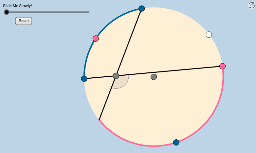
This GeoGebra mathematical example demonstrates the geometric relationship between the angle formed by two intersecting chords inside a circle and the arcs they intercept, verifying that the angle measure is half the sum of the intercepted arcs. The core mathematical concepts involved include circles, chords, arcs, the intersecting chords angle theorem, and basic angle arithmetic. To construct this dynamic model, the applet utilizes a suite of GeoGebra commands including Circle, Segment, Point, CircleArc, Ray, Intersect, Angle, CircleSector, Vector, Translate, and Rotate, generating interactive objects such as points A, B, C, D, and list structures to calculate and visualize the angles in real-time. This resource is highly suitable for middle school and high school geometry curricula, serving as an excellent tool for student-led inquiry and visual classroom instruction.
GeoGebra Commands & Parameters
Circle(A, B) → cSegment(A, B) → aPoint(c) → CPoint(c) → DSegment(C, D) → dPoint(d) → ECircleArc(A, C, D) → ePoint(e) → FCircleArc(A, D, C) → fRay(F, E) → bIntersect(f, b, 1) → GSegment(F, E) → gSegment(E, G) → hSegment(C, E) → iSegment(E, D) → jMin(list1) → kCircle(E, (0.4 * k)) → pSegment(A, G) → lSegment(A, C) → mSegment(A, F) → nSegment(A, D) → qIntersect(p, h, 1) → JIntersect(p, i, 1) → KIntersect(p, g, 1) → LIntersect(p, j, 1) → MDilate(A, If[0 < o ≤ 1, 1 - o, 0], G) → A'Dilate(A, If[0 < o ≤ 1, 1 - o, 0], C) → A'_1Dilate(A, If[0 < o ≤ 1, 1 - o, 0], F) → A'_2Dilate(A, If[0 < o ≤ 1, 1 - o, 0], D) → A'_3Dilate(A, If[4 < o ≤ 5, 5 - o, 0], E) → A'_6Dilate(A, If[6 < o ≤ 7, 7 - o, 0], E) → A'_7Angle(J, E, K) → ζCircleArc(A, F, D) → e_2CircleArc(A, G, C) → f_2Intersect(p, h, 1) → RCircleSector(E, R, K) → g_2CircleArc(A, D, F) → c_1Point(c_1) → SCircleArc(A, C, G) → d_1Point(d_1) → TDilate(T, If[0 < o ≤ 1, 1 - o, 0], G) → T'Dilate(T, If[0 < o ≤ 1, 1 - o, 0], C) → T'_1Dilate(S, If[1 < o ≤ 2, 2 - o, 0], D) → S'Dilate(S, If[1 < o ≤ 2, 2 - o, 0], F) → S'_1Segment(T, T') → a_1Segment(T, C) → b_1Segment(T, T'_1) → e_1Segment(S, S'_1) → f_1Segment(S, S') → g_1Segment(T, G) → h_1Segment(S, F) → i_1Segment(S, D) → j_1Circle(S, (0.4 * k)) → rCircle(T, (0.4 * k)) → k_1Intersect(k_1, b_1) → H,Intersect(k_1, h_1) → I,Intersect(r, i_1, 1) → NIntersect(r, j_1, 1) → OCircleSector(T, I, H) → p_1CircleSector(S, N, O) → q_1Dilate(T, If[2 < o ≤ 3, 3 - o, 0], E) → T'_2Vector(T, T'_2) → wTranslate(p_1, w) → r_1Translate(H, w) → H'Angle(H', E, K) → εRotate(r_1, If[3 < o ≤ 4, ((o - 3) * ε), ε], E) → s_1Dilate(S, If[4 < o ≤ 5, 5 - o, 0], E) → S'_2Vector(S, S'_2) → u_1Translate(q_1, u_1) → t_1Translate(O, u_1) → O'Translate(I, w) → I'Rotate(I', ε, E) → I''Angle(O', E, I'') → ηRotate(t_1, If[5 < o ≤ 6, ((o - 5) * η), η], E) → c_2
AI Drawing Prompt Reference
Draw a circle with a center point and another point on the circumference, connected by a radius. Place two points on the circle and connect them to form a chord. Choose a point on this chord as the intersection. From this intersection, draw a ray to another point on the circle, creating two intersecting chords. Highlight the angle at the intersection with a distinct color or style, and show the two intercepted arcs on the circle. Use dashed or lighter arcs to indicate these intercepted arcs and label their measures. Add a small circle around the intersection to emphasize the angle's sides. Finally, use arrows or annotations to illustrate that the angle measure equals half the sum of the intercepted arcs.
The prompt above was compiled from the original drawing commands and is for reference only.