
Angle Between Two Planes by peterkite2
Loading the math board and drawing, please wait…
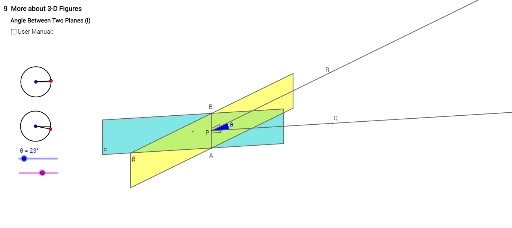
This example demonstrates how to calculate the angle between two planes using geometric construction. Key mathematical concepts include plane geometry and angle measurement. Using GeoGebra commands such as Segment, Circle, Point, Angle, Vector, and Polygon, the construction process is visually illustrated. Suitable for high school and above students or teachers for teaching or self-study.
GeoGebra Commands & Parameters
Segment(rotateLRc, rotateLR0) → aCircle(rotateLRc, rotateLR0) → cPoint(c) → rotateLRAngle(rotateLR0, rotateLRc, rotateLR) → αSegment(rotateLRc, rotateLR) → bCircle(rotateUDc, rotateUD0) → dPoint(d) → rotateUDAngle(rotateUD0, rotateUDc, rotateUD) → βSegment(rotateUDc, rotateUD0) → eSegment(rotateUDc, rotateUD) → fVector(O, O + (0, sin(β))) → OzVector(O, O + (cos(α), (sin(α) * cos(β)))) → OxVector(O, O + ((-1 * sin(α)), (cos(α) * cos(β)))) → OyPolygon(A1, A3, A4, A6) → poly1, a1, a3, a4, a6Polygon(A10, A12, A13, A15) → poly2, a10, a12, a13, a15Angle(A14, P, A2) → θ_1Ray(P, A14) → iRay(P, A2) → jPoint(j) → CPoint(i) → RCircle(P, 4) → kIntersect(k, j, 1) → QSegment(A, B) → lSegment(A16, A18) → mSegment(A18, A17) → nSegment(A19, A21) → pSegment(A21, A20) → q
AI Drawing Prompt Reference
Draw the angle between two planes by first constructing their normal vectors, then creating these vectors through rotation and translation, and calculating the angle between them. Finally, construct a tetrahedron using vectors and points and calculate one of its dihedral angles.
The prompt above was compiled from the original drawing commands and is for reference only.