
Angle Between Two Planes by Anthony OR 柯志明
Loading the math board and drawing, please wait…
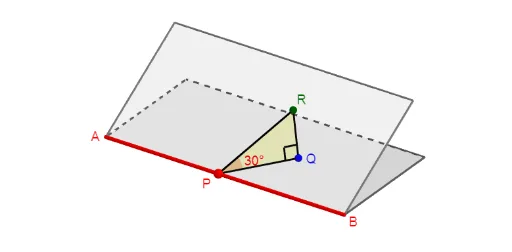
This example demonstrates the calculation and visualization of the angle between two planes. It involves core mathematical concepts such as plane equations, vector dot product, cosine theorem, and solid geometry. Construction highlights include using GeoGebra commands like Point, Segment, Polygon, OrthogonalLine, Plane, Circle, Intersect, Angle, OrthogonalPlane, Rotate to build the planes and their angle. Suitable for high school solid geometry teaching or self-study to understand spatial geometric relationships.
GeoGebra Commands & Parameters
Point(xAxis) → APoint(xAxis) → BSegment(A, B) → fPoint(f) → PPolygon(A, B, C, D) → q1, a, b, c, dPoint(Sequence[P + ((3 * cos((2° * i))), (3 * sin((2° * i))), 0), i, 0, 90]) → QSegment(P, Q) → gOrthogonalLine(Q, xOyPlane) → hPoint(h) → EPlane(P, Q, E) → eOrthogonalLine(Q, e) → iCircle(Q, (Distance[P, Q] * tan(30°)), i) → kIntersect(h, k, 1) → FPoint(Sequence[Rotate[F, (2° * i), g], i, -45, 45]) → RPolygon(P, Q, R) → t1, r, p, qAngle(R, Q, P) → αAngle(Q, P, R) → βOrthogonalPlane(R, a) → jIntersect(a, j) → GOrthogonalLine(R, q1) → lIntersect(l, q1) → HAngle(H, G, R) → γRotate(q1, γ, a) → q1'Angle(B, P, Q) → δAngle(B, P, R) → ε
AI Drawing Prompt Reference
Visualize the angle between two intersecting planes, highlighting calculation and spatial relationships. Start with a baseline, then place a point on it to form the first plane. Determine the second plane using vector rotation and orthogonal lines. Label the intersection line and the angle between planes, incorporating rotation and angle measurement tools to illustrate solid geometry concepts.
The prompt above was compiled from the original drawing commands and is for reference only.