
Angle between Two Planes (Basic)
Loading the math board and drawing, please wait…
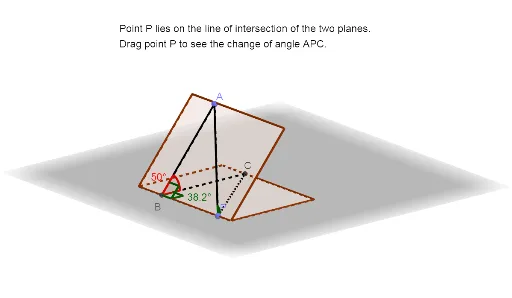
This example demonstrates how to calculate the angle between two planes. Key math concepts include plane equations, vector dot product, and the cosine theorem. Construction highlights involve GeoGebra commands/objects like Polygon, Rotate, PointIn, OrthogonalLine, Intersect, Segment, Angle, and Point. Suitable for high school solid geometry teaching or self-learning to understand angle calculations in spatial geometry.
GeoGebra Commands & Parameters
Polygon(B_1, A_1, C_1, D) → q1, b, a, c, dRotate(q1, 50°, xAxis) → q1'PointIn(q1') → AOrthogonalLine(A, a, space) → fIntersect(a, f) → BSegment(A, B) → gAngle(A, B, C_1) → αOrthogonalLine(B, d, space) → hIntersect(d, h) → CAngle(A, B, C) → βSegment(C, B) → iAngle(C, B, C_1) → γPoint(a) → PSegment(A, P) → jSegment(C, P) → kAngle(A, P, C) → δ
AI Drawing Prompt Reference
Draw the angle between two planes. First, draw a quadrilateral, then rotate it 50 degrees to get a new quadrilateral, and select a point A from it. Construct a perpendicular line from A to one side of the quadrilateral to find point B. Connect AB and calculate ∠ABC1. Next, construct a perpendicular line from B to another side of the quadrilateral to find point C. Calculate ∠ABC. Finally, connect AC and calculate ∠ACB1.
The prompt above was compiled from the original drawing commands and is for reference only.