
Angle between a Line and a Plane by Anthony OR 柯志明
Loading the math board and drawing, please wait…
In collections
Projections and Angles
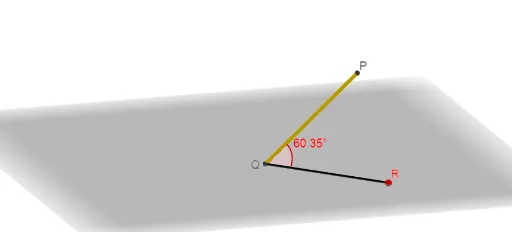
This example demonstrates how to calculate the angle between a line and a plane. It involves core mathematical concepts like vectors, dot product, angle calculation, and solid geometry. GeoGebra commands and objects used include Intersect, PointIn, Segment, Angle, and Sequence for construction. Suitable for high school and above students learning spatial geometry.
GeoGebra Commands & Parameters
Intersect(yAxis, xAxis) → QPointIn(xOyPlane) → RSegment(R, Q) → fSegment(P, Q) → gAngle(R, Q, P) → αSequence(Ray[Q + (i / 16 * (R - Q)), Q + (i / 16 * (R - Q)) + P - R], i, 0, 16) → list1Sequence(Vector[Q + (i / 16 * (R - Q)) + (1.4 * (P - R)), Q + (i / 16 * (R - Q)) + (1.3 * (P - R))], i, 0, 16) → list2Segment(P, R) → hAngle(Q, R, P) → β
AI Drawing Prompt Reference
Draw the angle between a line and a plane, demonstrating core mathematical concepts like vectors, dot product, angle calculation, and solid geometry. First, draw a line segment at the intersection of the coordinate axes, then extend another line segment from this point towards the plane. Calculate and display the angle between the two segments. Next, use multiple line segments and vectors extending along the first segment to simulate the dynamic change of the angle, and finally indicate the relationship between the two segments and the plane's angle.
The prompt above was compiled from the original drawing commands and is for reference only.