
Angle at Circumference Demo
Loading the math board and drawing, please wait…
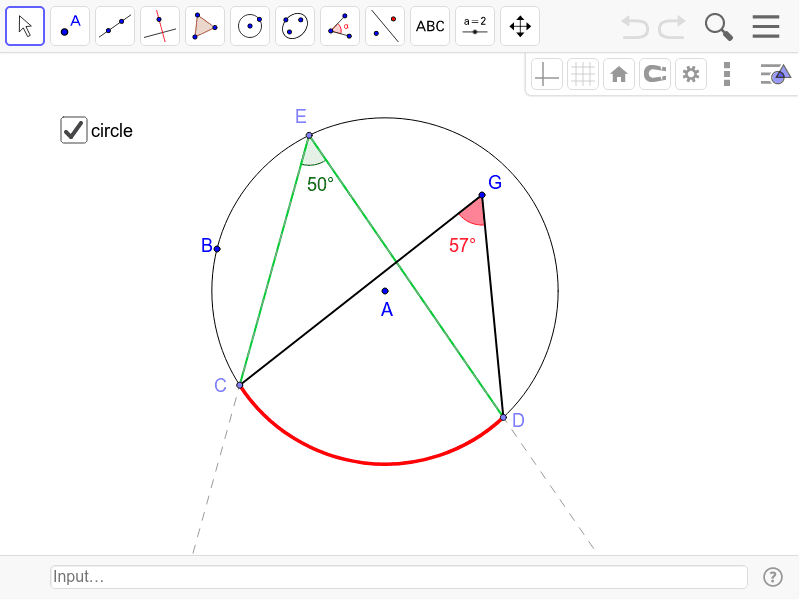
This example demonstrates the Angle at Circumference theorem, showing that angles in the same segment are equal. It involves core concepts like circle, angle, angle at circumference theorem, and geometric construction. Constructed using commands such as Circle, Point, Segment, AngularBisector, Intersect, CircumcircleArc, Angle, Ray, Polygon. Suitable for high school mathematics teaching to understand and verify the theorem.
GeoGebra Commands & Parameters
Circle(A, B) → cPoint(c) → CPoint(c) → DPoint(c) → ESegment(C, E) → aSegment(E, D) → bAngularBisector(C, E, D) → dIntersect(c, d, 2) → FCircumcircleArc(C, F, D) → eAngle(C, E, D) → βRay(E, C) → fRay(E, D) → gRay(C, G) → hSegment(G, D) → iIntersect(c, h, 2) → HSegment(H, D) → jSegment(C, H) → lSegment(C, G) → kPolygon(G, H, D) → poly1, d_1, g_1, h_1Angle(C, G, D) → θAngle(C, H, D) → γAngle(H, D, G) → α
AI Drawing Prompt Reference
Draw a circle and mark three points on its circumference. Connect two of the points to form a segment, then draw the angle bisector of this segment, which intersects the circle at another point. Connect this point to the other two points on the circle and measure the angle formed by these two segments at the circle. Draw two rays from the point where the angle bisector intersects the circle, passing through the endpoints of the segment. Then, construct an angle equal to the angle at the circumference and measure both angles.
The prompt above was compiled from the original drawing commands and is for reference only.