
Angle-Angle-Angle (AAA) Triangle Congruence Exploration
Loading the math board and drawing, please wait…
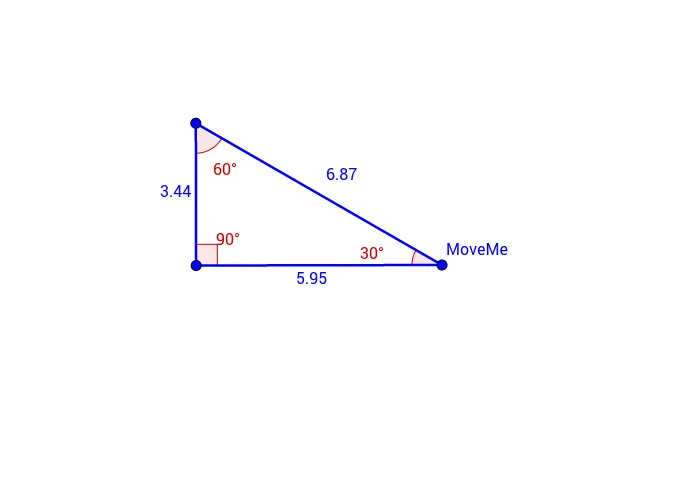
This GeoGebra example dynamically demonstrates that having three corresponding angles equal (AAA) does not guarantee triangle congruence, but only similarity. The core mathematical concept is the distinction between triangle congruence and similarity, highlighting why AAA is not a valid congruence criterion. The construction uses commands such as Rotate to rotate the triangle, Angle to display angles α, β, γ, Ray and Point to create rays and points, and Segment to form sides. A draggable point MoveMe and auxiliary objects A', B', C'' allow users to resize the triangle while keeping angles fixed, visually showing that triangles of different sizes can share the same angle measures. This is ideal for middle school or high school geometry classes to reinforce the correct congruence theorems (SSS, SAS, ASA, AAS) and clarify common misconceptions about AAA.
GeoGebra Commands & Parameters
Rotate(A, 30°, MoveMe) → A'Angle(A, MoveMe, A') → αRotate(MoveMe, 90°, A') → B'Angle(MoveMe, A', B') → βRay(MoveMe, A') → fRay(A', B') → gPoint(g) → CRotate(A', 60°, C) → A''Angle(A', C, A'') → γRay(C, A'') → hSegment(C, A') → iSegment(A', MoveMe) → jSegment(MoveMe, C) → k
AI Drawing Prompt Reference
Draw a draggable triangle where one vertex is movable and the other two are generated by rotations. Start with the movable point as center, rotate another vertex by 30 degrees to get a new point, and display that angle. Then use the new point as center, rotate the movable point by 90 degrees to get a third vertex, and display the second angle. Draw rays from the movable point to the new point and from the new point to the third vertex, then pick a point on the second ray as the triangle's third vertex. Next, with that third vertex as center, rotate the new point by 60 degrees to get an auxiliary point, display the third angle, and draw a ray from the third vertex to the auxiliary point. Finally, connect the three vertices with segments to form the triangle, keeping all three sides visible. The figure shows similar triangles with fixed angles but variable side lengths.
The prompt above was compiled from the original drawing commands and is for reference only.