
Side-Side-Angle (SSA/ASS) Triangle Congruence
Loading the math board and drawing, please wait…
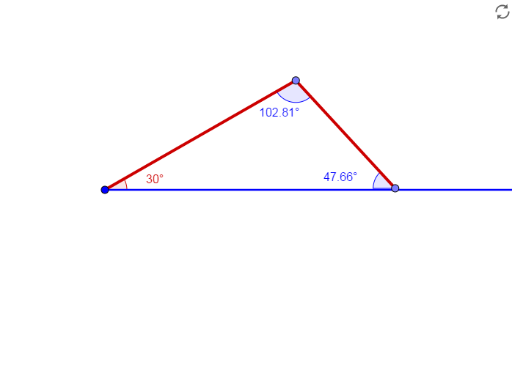
This example demonstrates the triangle congruence criteria under Side-Side-Angle (SSA/ASS) conditions. It involves core mathematical concepts such as triangle congruence determination, geometric construction, and angle measurement. Key GeoGebra commands used include Ray, Rotate, Angle, Point, and Segment for constructing the figure. Suitable for middle school and above mathematics learners to understand triangle congruence theorems and applications.
GeoGebra Commands & Parameters
Ray(A, B) → fRotate(B, 30°, A) → B'Angle(B, A, B') → αRay(A, B') → gPoint(Circle[A, 6]) → CSegment(A, C) → hPoint(Circle[C, 4]) → DSegment(C, D) → iAngle(A, C, D) → βAngle(C, D, A) → γ
AI Drawing Prompt Reference
Draw a triangle demonstrating SSA/ASS congruence criteria. Start by drawing a ray, then rotate it from a point on the ray to form a specified angle, creating a second ray. Next, draw a circle centered at one endpoint intersecting the second ray, and connect this point to the first endpoint. From the intersection point, draw another circle to intersect the first ray, and connect these two points. Finally, measure and label the three angles formed at the vertices.
The prompt above was compiled from the original drawing commands and is for reference only.