
Angle Addition Without Measurement
Loading the math board and drawing, please wait…
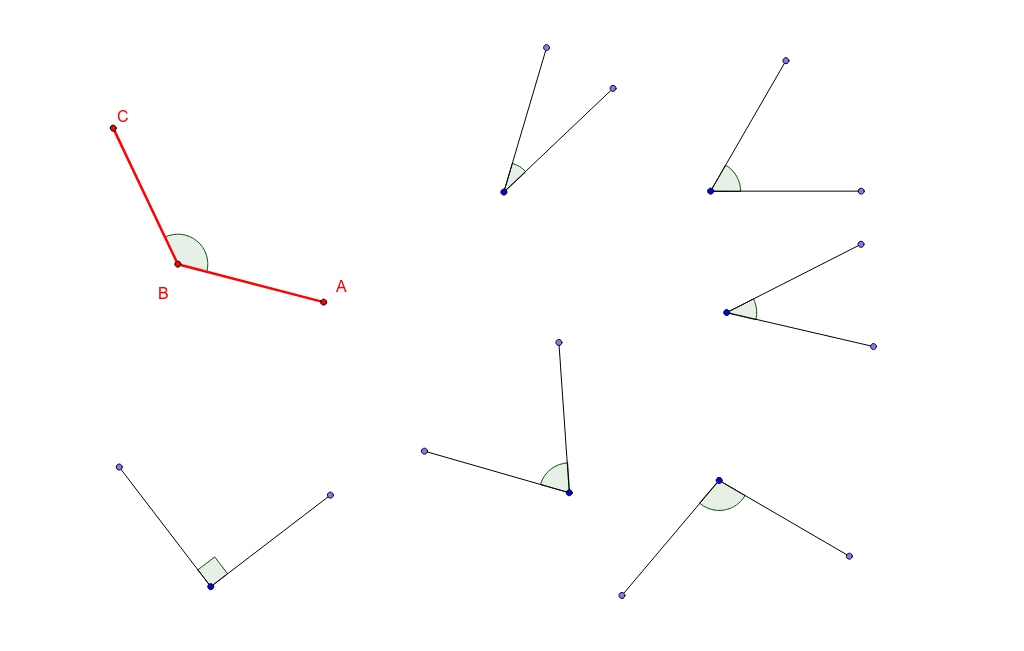
This example demonstrates angle addition without measurement. The key mathematical concept is angle addition. Using GeoGebra commands such as Point, Segment, Rotate, and Angle, a dynamic model of angle addition is constructed. Suitable for students at the junior high school level and above for geometric construction.
GeoGebra Commands & Parameters
Point(Circle[A, 2]) → BSegment(A, B) → aRotate(A, 130*°, B) → CAngle(A, B, C) → αSegment(B, C) → bPoint(Circle[C_1, 2]) → DSegment(C_1, D) → cRotate(D, 30*°, C_1) → D'Angle(D, C_1, D') → βSegment(C_1, D') → dPoint(Circle[E, 2]) → FSegment(E, F) → eRotate(F, 100*°, E) → F'Angle(F, E, F') → γSegment(E, F') → fPoint(Circle[G, 2]) → HSegment(G, H) → gRotate(H, 70*°, G) → H'Angle(H, G, H') → δSegment(G, H') → hPoint(Circle[I, 2]) → JSegment(I, J) → iRotate(J, 60*°, I) → J'Angle(J, I, J') → εSegment(I, J') → jPoint(Circle[K, 2]) → LSegment(K, L) → kRotate(L, 90*°, K) → L'Angle(L, K, L') → ζSegment(K, L') → lPoint(Circle[M, 2]) → NSegment(M, N) → mRotate(N, 40*°, M) → N'Angle(N, M, N') → ηSegment(M, N') → n
AI Drawing Prompt Reference
Create several angle constructions. For each, draw a point, then a circle of radius two around it. On the circle mark a point and connect it to the center with a segment. Rotate this point around the center by a given angle to produce a second point, then draw a segment from the center to the rotated point. The angle formed by the center, the original point, and the rotated point is displayed. Repeat this process with different centers and rotation angles to generate a series of related angles.
The prompt above was compiled from the original drawing commands and is for reference only.