
Analog Clock Templates for GeoGebra Classroom
Loading the math board and drawing, please wait…
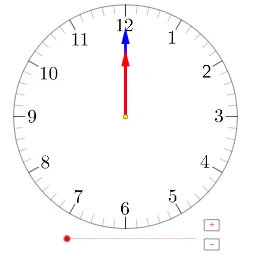
① This example demonstrates how to construct an interactive analog clock in GeoGebra, with hour and minute hands and tick marks, suitable for classroom demonstrations of time reading. ② Core math concepts include angle rotation, coordinates on a circle, trigonometric functions (sine/cosine), and sequence generation. ③ Construction highlights: uses Rotate command to rotate hands, Angle to define angles, Segment for hands, Sequence for tick marks, Circle for the dial, Element and Vector for positioning, Polygon for decorative elements; objects include hour hand hr, minute hand min, radius r, center A, and buttons button1/button2 to control animation. ④ Ideal for middle school or high school math classes to teach angles, rotation, and periodic phenomena, and as a beginner GeoGebra exercise.
GeoGebra Commands & Parameters
Rotate(A + (0, r - (2 * h)), ((-(6°)) * min), A) → PAngle(P, A, N) → αIf(floor(a / 60) ≟ 0, 12, floor(a / 60)) → hrSegment(A + (0, r), A + (0, r - h)) → a1Sequence(Rotate[a1, (30 * i°), A], i, 0, 11) → list1Segment(A + (0, r), A + (0, r - m)) → a2Sequence(Sequence[Rotate[a2, (i * 30°) + (j * 6°), A], j, 1, 4], i, 0, 11) → list2Circle(A, r) → cSequence(Rotate[A + (0, r - h), ((-(30°)) * i), A], i, 1, 12) → list6Element(list6, 1) → BElement(list6, 2) → CElement(list6, 3) → DElement(list6, 4) → EElement(list6, 5) → FElement(list6, 6) → GElement(list6, 7) → HElement(list6, 8) → IElement(list6, 9) → JElement(list6, 10) → KElement(list6, 11) → LElement(list6, 12) → MSequence(Rotate[A + (0, r - (2.5 * h)), ((-(6°)) * i), A], i, 0, 59) → list3Vector(A, P) → uSequence(Rotate[A + (0, (0.5 * r)), ((-(30°)) * j) - α / 12, A], j, 0, 11) → list4Rotate(A + (0, (0.6 * r)), ((-(30°)) * hr) - α / 12, A) → QVector(A, Q) → vPolygon(O, R, S, T) → poly1, o, r_1, s, tIf(hr + 1 > 12, 1, hr + 1) → hr_t
AI Drawing Prompt Reference
Draw an analog clock with hour and minute hands and tick marks. The hour hand moves once per hour, and the minute hand moves once per minute. There are 12 equally spaced tick marks around the clock. The position of the hands is determined by angles, and the hands are rotated using the Rotate command. The radius of the clock is twice the length of the hour hand minus twice the hour number.
The prompt above was compiled from the original drawing commands and is for reference only.