
An Objection to Transcendental Definition: Quadrilateral Circumcircle and Rotati
Loading the math board and drawing, please wait…
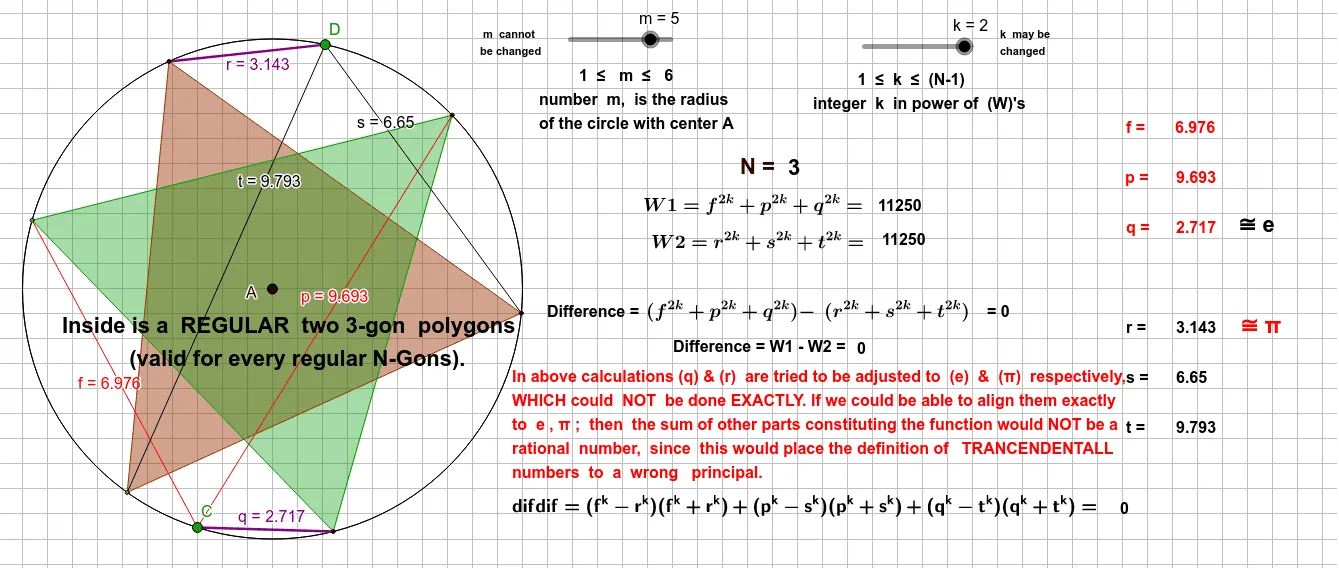
This GeoGebra example demonstrates a dynamic geometric construction involving a general quadrilateral and its circumcircle, with rotations, angle measurements, and segment connections, raising an intuitive objection to the concept of a 'transcendental definition'. Core mathematical concepts include circles and circumscribed circles, general quadrilaterals, equilateral triangles, geometric transformations (rotation), symmetry, and geometric mean. The construction uses GeoGebra commands such as Circle, Point, Rotate, Angle, Segment, and Polygon, creating multiple points (A, B, C, D, G, K, H, etc.), circle c, rotated points G', G'', K', K'', angles α, β, γ, δ, and various segments and text labels. This is suitable for high school or university geometry instruction, exploring properties of geometric objects under transformations, relationships between circumcircles and polygons, and how dynamic demonstrations can test the validity of mathematical definitions.
GeoGebra Commands & Parameters
Circle(A, m) → cPoint(c) → BPoint(c) → GCircle(H, m) → dPoint(d) → KRotate(G, 120°, A) → G'Angle(G, A, G') → αRotate(G', 120°, A) → G''Angle(G', A, G'') → βSegment(G, A) → gSegment(A, G') → hSegment(A, G'') → iRotate(K, 120°, H) → K'Angle(K, H, K') → γRotate(K', 120°, H) → K''Angle(K', H, K'') → δSegment(H, K) → jSegment(H, K') → lSegment(H, K'') → nPoint(c) → CSegment(C, G) → fSegment(C, G'') → pSegment(C, G') → qPoint(d) → DSegment(D, K'') → rSegment(D, K') → sSegment(D, K) → tPolygon(K'', K, K') → t1, k', k'', k_1Polygon(G, G'', G') → t2, g', g_1, g''
AI Drawing Prompt Reference
Draw two circles with equal radius but different centers. On the first circle, place three points forming an equilateral triangle, and connect the center to each vertex with segments. On the second circle, similarly place three points forming another equilateral triangle, and connect its center to its vertices. Then add one extra point on each circle, and connect these extra points to the three points on their respective circles, creating additional segments. Finally, connect the three points on each circle to form two triangles, and label all angles.
The prompt above was compiled from the original drawing commands and is for reference only.