
Ambiguous Case of the Law of Sines (SSA) Dynamic Demo
Loading the math board and drawing, please wait…
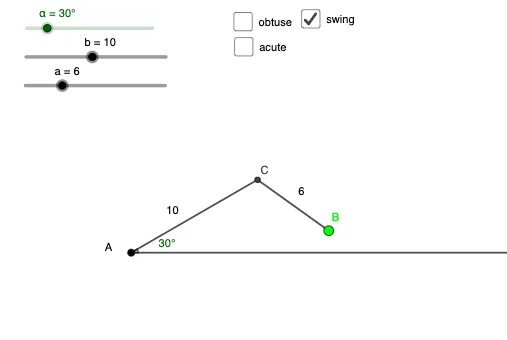
This GeoGebra example dynamically illustrates the ambiguous case of the Law of Sines, where given two sides and a non-included angle (SSA), the number of possible triangles can be zero, one, or two. It focuses on the core trigonometric concepts of the sine rule, triangle existence conditions, and the relationship between angles and side lengths. The construction uses commands such as Segment, Circle, Intersect, Point, Ray, Angle, and Midpoint to build the triangle elements, with circles and rays intersecting to reveal the different solution scenarios, and text objects to label angles and sides. This is ideal for high school or introductory college students learning trigonometry and solving triangles, providing a visual and interactive way to understand why the SSA case is ambiguous and how the geometry determines the possible solutions.
GeoGebra Commands & Parameters
Segment(A, B) → fCircle(B, a) → cIntersect(g, xAxis) → CIntersect(c, g) → D, ESegment(B, E) → hSegment(B, D) → iSegment(A, D) → jSegment(A, E) → kPoint(c) → FSegment(B, F) → lRay(A, G) → nAngle(G, A, B) → βMidpoint(f) → HMidpoint(l) → IMidpoint(h) → JMidpoint(i) → K
AI Drawing Prompt Reference
Draw a triangle ABC with side AB of length a, angle B of β degrees, and side BC of length c. First, draw segment AB. Then, draw a circle centered at B with radius c, intersecting the extension of AB at point C. Next, draw a circle centered at B with radius a, intersecting the circle centered at B at points D and E. Draw segments BD and BE, intersecting the extension of AB at point F. Draw a ray from A at an angle β to the extension of AB, intersecting the circle centered at B at point G. Finally, draw segments AG and connect it to the circle centered at B at points H and I, then draw segment BH and it will intersect the ray AG at point J.
The prompt above was compiled from the original drawing commands and is for reference only.