
Always a Parallelogram
Loading the math board and drawing, please wait…
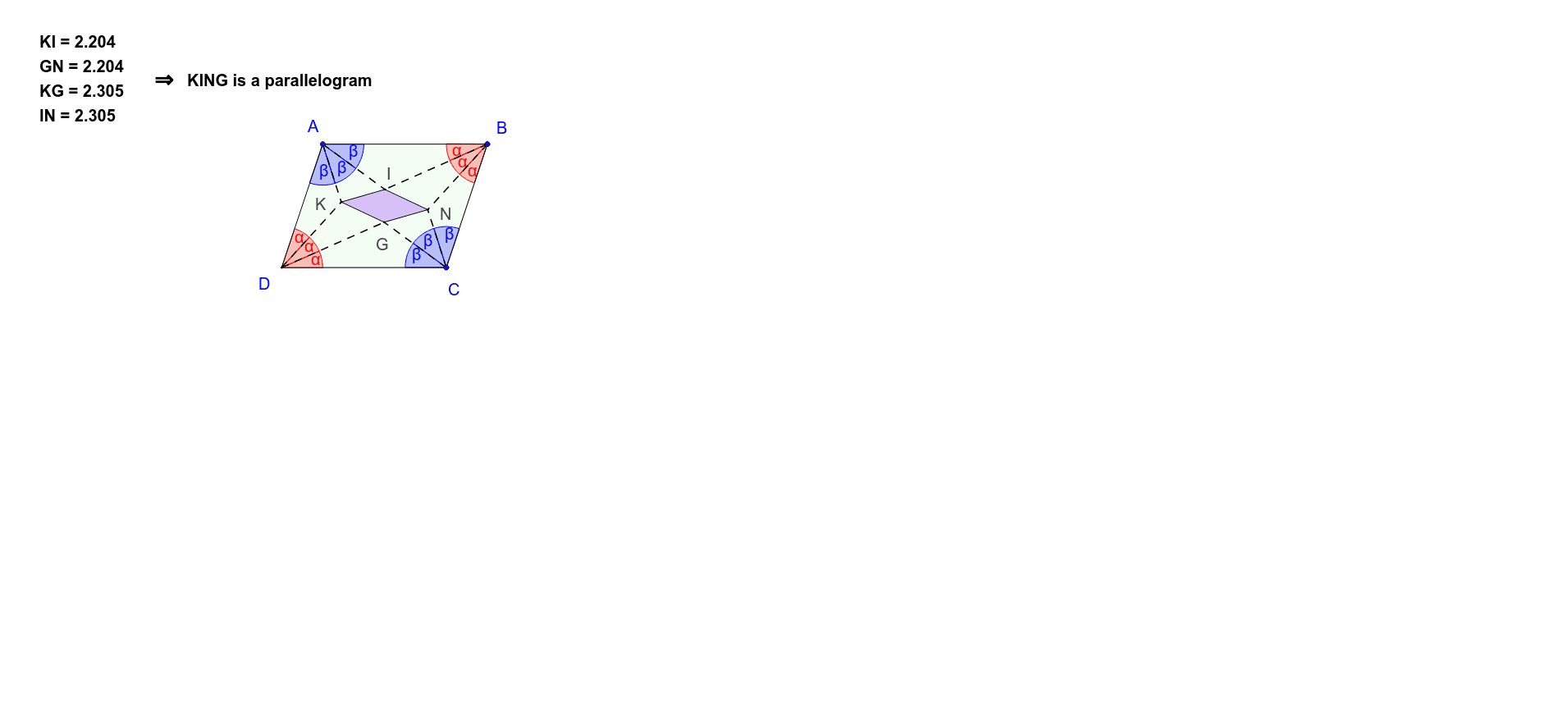
This example demonstrates the construction of a parallelogram through rotation and reflection. It involves core mathematical concepts such as the properties of parallelograms, rotational transformations, reflection transformations, and angle calculations. The construction uses GeoGebra commands/objects like Polygon, Angle, Rotate, Line, Intersect, and Segment. It is suitable for high school students learning and understanding the construction methods and transformation characteristics of parallelograms.
GeoGebra Commands & Parameters
Polygon(A, B, C, D) → poly1, a, b, c, dAngle(poly1) → α, β, γ, δRotate(D, α / 3, A) → D'Angle(D, A, D') → εRotate(D, (2 * α / 3), A) → D'_1Angle(D, A, D'_1) → ζLine(A, D') → fLine(A, D'_1) → gAngle(D, A, D') → ηAngle(D', A, D'_1) → θAngle(D'_1, A, B) → ιRotate(B, γ / 3, C) → B'Angle(B, C, B') → κRotate(B', γ / 3, C) → B''Angle(B', C, B'') → λRotate(B'', γ / 3, C) → B'''Angle(B'', C, B''') → μLine(C, B') → hLine(C, B'') → iRotate(A, β / 3, B) → A'Angle(A, B, A') → νRotate(A', β / 3, B) → A''Angle(A', B, A'') → ξRotate(A'', β / 3, B) → A'''Angle(A'', B, A''') → οLine(B, A') → jLine(B, A'') → kIntersect(h, k) → NIntersect(g, j) → IRotate(C, δ / 3, D) → C'Angle(C, D, C') → ρRotate(C', δ / 3, D) → C''Angle(C', D, C'') → σRotate(C'', δ / 3, D) → C'''Angle(C'', D, C''') → τLine(D, C') → lLine(D, C'') → mIntersect(i, l) → GIntersect(f, m) → KPolygon(K, I, N, G) → poly2, k_1, i_1, n, g_1Segment(A, I) → pSegment(A, K) → qSegment(B, I) → rSegment(B, N) → sSegment(C, N) → tSegment(C, G) → eSegment(D, G) → f_1Segment(D, K) → h_1
AI Drawing Prompt Reference
Draw an arbitrary quadrilateral with its four interior angles labeled. At each vertex, rotate the two adjacent sides outward by one-third of that vertex's angle, creating three rays from each vertex. Mark the intersections of these rays with the opposite sides, forming a new inner quadrilateral. Connect each original vertex to the nearest new quadrilateral vertex with a segment, illustrating the parallelogram formed by these rotational and reflective constructions.
The prompt above was compiled from the original drawing commands and is for reference only.