
Advanced Unit Fractions: Subdividing Fraction Units with Geometric Transformatio
Loading the math board and drawing, please wait…
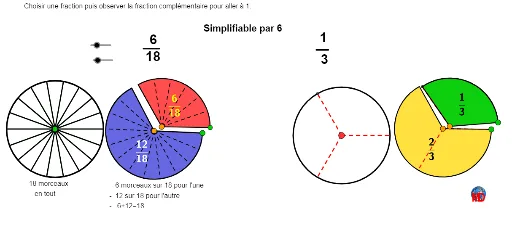
① This example demonstrates how to subdivide unit fractions into smaller fractional parts on a circle or along segments using geometric transformations (rotation, translation, reflection), visually representing fraction addition and decomposition. ② Core mathematical concepts include fractions, unit fractions, greatest common divisor (GCD), fraction simplification, circles and arcs, parallelograms, geometric transformations (rotation, translation, reflection), and indefinite integrals as a background notion. ③ Construction highlights: Using GeoGebra commands such as Sequence, Rotate, CircleSector, GCD, Circle, Vector, Translate, Segment, Point, Midpoint, Mirror, and CircleArc, the applet builds multiple lists of fractional units (liste1 to liste5) and uses a button (Bouton1) and text objects (Text3, etc.) to dynamically show subdivision and combination of fractions. ④ Suitable for middle school mathematics (fractions and geometry) teaching, as well as for undergraduate number theory or math education visualization, helping students connect fractional units with geometric transformations.
GeoGebra Commands & Parameters
Sequence(Rotate[B, ((i * 360) * ° / denom), A], i, 1, denom) → liste1Sequence(Segment[A, Element[liste1, i]], i, 1, denom) → liste3Rotate(B, ((num * 360) * ° / denom), A) → B'_1CircleSector(A, B, B'_1) → dGCD(num, denom) → PGCDCircle(A, B) → eCircle(A, B) → cSequence(Segment[A, Element[liste1, i]], i, 1, denom) → liste2Circle(A, B) → hVector(A, C) → uTranslate(h, u) → h'Translate(B, u) → DRotate(D, ((num * 360) * ° / denom), C) → D'Sequence(Rotate[D, (((PGCD * i) * 360) * ° / denom), C], i, 1, denom / PGCD) → liste4CircleSector(C, D, D') → kSequence(Segment[C, Element[liste4, i]], i, 1, denom / PGCD) → liste5CircleSector(C, D, D') → fSegment(E, F) → iSegment(G, H) → jCircle(I, R) → pPoint(p) → JRotate(J, ((num * 360) * ° / denom), I) → J'CircleSector(I, J, J') → qSequence(Rotate[J, ((i * 360) * ° / denom), I], i, 1, num) → liste1bSequence(Segment[I, Element[liste1b, i]], i, 1, num) → liste2bCircleSector(I, J, J') → rCircle(K, R) → sPoint(s) → LRotate(L, ((num * 360) * ° / denom), K) → L'CircleSector(K, L', L) → tSequence(Rotate[L', ((i * 360) * ° / denom), K], i, 1, denom) → liste1cSequence(Segment[K, Element[liste1c, i]], i, 1, denom - num) → liste2cCircleSector(K, L', L) → c_1Midpoint(I, J) → NRotate(N, (((0.5 * num) * 360) * ° / denom), I) → N'Midpoint(K, L) → ORotate(O, (((0.5 * num) * 360) * ° / denom), K) → L'_1Mirror(L'_1, K) → PCircle(M, R) → d_1Point(d_1) → QRotate(Q, ((num * 360) * ° / denom), M) → Q'CircleSector(M, Q, Q') → e_1CircleSector(M, Q, Q') → f_1Sequence(Rotate[Q, (((PGCD * i) * 360) * ° / denom), M], i, 1, num2) → liste4bSequence(Segment[M, Element[liste4b, i]], i, 1, num / PGCD) → liste5bSegment(M, Q) → lSegment(M, Q') → mCircleArc(M, Q, Q') → g_1Circle(R_1, R) → h_1Point(h_1) → SRotate(S, ((num * 360) * ° / denom), R_1) → S'CircleSector(R_1, S', S) → k_1CircleSector(R_1, S', S) → p_1Sequence(Rotate[S', ((i * 360) * ° / denom2), R_1], i, 1, denom2 - num2) → liste4cSequence(Segment[R_1, Element[liste4c, i]], i, 1, denom - num) → liste5cMidpoint(M, Q) → TRotate(T, (((0.5 * num) * 360) * ° / denom), M) → T'Midpoint(R_1, S) → URotate(U, (((0.5 * num) * 360) * ° / denom), R_1) → U'Mirror(U', R_1) → U''
AI Drawing Prompt Reference
Draw a geometric diagram with multiple circles and sectors to illustrate subdivision and combination of unit fractions. Start with a large circle divided into equal parts by radial segments, with one sector shaded to represent the numerator. Next to it, translate a copy of the circle and rotate its division lines to show fraction simplification. Then add two smaller circles, shading sectors for numerator and denominator respectively, and connect their midpoints with arcs to demonstrate fraction addition. Use clear spacing and connecting segments to emphasize the relationship between fractions and geometric transformations.
The prompt above was compiled from the original drawing commands and is for reference only.