
Adjusting a Cupcake Recipe with Ratios
Loading the math board and drawing, please wait…
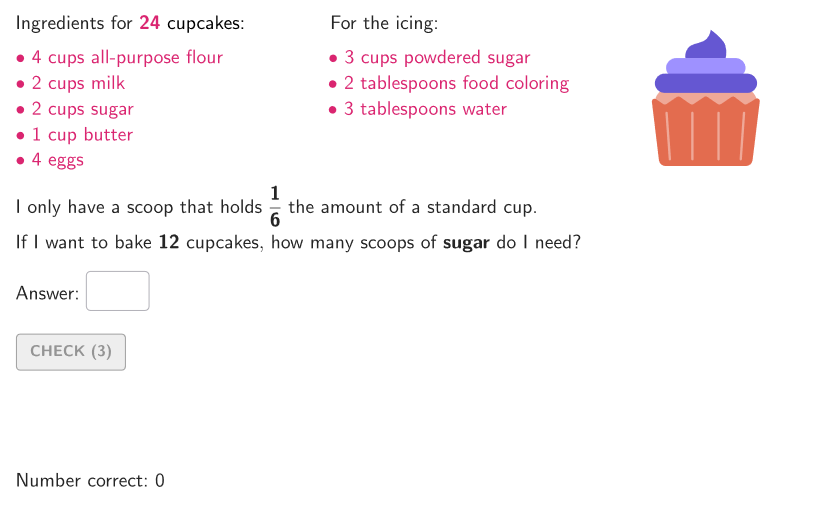
This example uses equivalent ratios to adjust a cupcake recipe. It involves core math concepts such as equivalent ratios and is constructed using GeoGebra commands like Shuffle, Element, and Textfield. Suitable for 6-8 grade students to solve problems involving equivalent ratios.
GeoGebra Commands & Parameters
Shuffle(Sequence[t, t, 1, 4, 1]) → allIngredTypes, {3, 2, 1, 4}Shuffle(Sequence[t, t, 4, 8, 1]) → allDen, {6, 8, 7, 5, 4}Element(allDen, Mod[countQuestion, Length[allDen]] + 1) → minicupDenElement(allIngredTypes, Mod[countQuestion, Length[allIngredTypes]] + 1) → ingredTypeElement({6, 8, 12, 12}, ingredType) → cakeNumShuffle(Sequence[15]) → randomList2, {14, 5, 3, 9, 10, 4, 6, 2, 15, 11, 12, 8, 13, 1, 7}Shuffle(Sequence[20]) → randomList1, {1, 8, 9, 6, 3, 11, 19, 17, 7, 5, 14, 12, 16, 2, 10, 20, 18, 4, 13, 15}Element(randomList2, Mod[countQuestion, 15] + 1) → randomNum2Element(randomList1, Mod[countQuestion, 20] + 1) → randomNum1Textfield(input1) → InputBox1Polygon(Zip[PixelsToPoint[Corner[1], Corner[3], Corner[5], A], A, {(pixelsLeft, pixelsTop), (pixelsLeft, y(Corner[5]) - pixelsBottom), Corner[5] - (pixelsRight, pixelsBottom), (x(Corner[5]) - pixelsRight, pixelsTop)}]) → borderBox
AI Drawing Prompt Reference
Create a diagram for a “cupcake recipe ratio adjustment” task. Include an input box area where the user can type or select the needed value. Draw a prominent rectangular border box as the main container or answer area, formed by four edges. Also set up the data elements representing numerator and denominator lists so they can be used to select corresponding numbers and form equivalent ratios. Keep the composition centered on the input and the comparison area for students to work with ratio equivalence.
The prompt above was compiled from the original drawing commands and is for reference only.