
Addition of Three Vectors
Loading the math board and drawing, please wait…
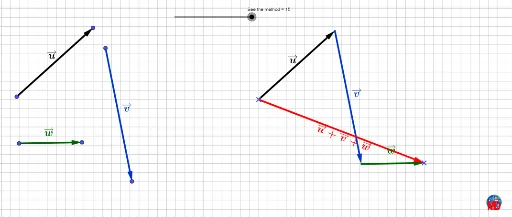
This GeoGebra example dynamically demonstrates the addition of three vectors by placing them head-to-tail sequentially, visually showing the resultant vector. The core mathematical concept is vector addition, including the triangle law and its extension to multiple vectors, involving translations, midpoints, and angles. Construction highlights: uses Vector commands to create vectors u, v, w, Translate to position them head-to-tail, Midpoint, Line, Point for auxiliary geometry, and Angle with RotateText for labels. Objects include points A, B, C, D, E and multiple text labels, forming a clear vector chain. Suitable for high school or early college students learning vector addition, and for teachers as a classroom demonstration tool to build geometric intuition.
GeoGebra Commands & Parameters
Vector(A, B) → uVector(C, D) → vTranslate(A, Vector[(If[a < 3, a / 3, 1] * Vector[A, E])]) → A'Translate(B, Vector[(If[a < 3, a / 3, 1] * Vector[A, E])]) → B'Vector(A', B') → wTranslate(C, Vector[(If[a ≤ 3, 0, If[3 < a < 6, (a - 3) / 3, 1]] * Vector[C, B'])]) → C'Translate(D, Vector[(If[a ≤ 3, 0, If[3 < a < 6, (a - 3) / 3, 1]] * Vector[C, B'])]) → D'Vector(C', D') → bMidpoint(B, A) → LMidpoint(C, D) → MMidpoint(C', D') → NMidpoint(B', A') → OVector(F, G) → dMidpoint(F, G) → HTranslate(F, Vector[(If[a ≤ 6, 0, If[6 < a < 9, (a - 6) / 3, 1]] * Vector[F, D'])]) → D'_1Translate(G, Vector[(If[a ≤ 6, 0, If[6 < a < 9, (a - 6) / 3, 1]] * Vector[F, D'])]) → G'Vector(D'_1, G') → cTranslate(E, Vector[(If[a ≤ 9, 0, If[9 < a < 12, (a - 9) / 3, 1]] * Vector[E, G'])]) → E'Vector(E, E') → eMidpoint(D'_1, G') → IMidpoint(E, E') → JLine(E', xAxis) → fPoint(f) → KAngle(E, E', K) → αRotateText(texte7, (-α)) → texte8
AI Drawing Prompt Reference
Draw a dynamic diagram showing the addition of three vectors by placing them head-to-tail sequentially, demonstrating vector addition including the triangle law and its extension to multiple vectors. Use translations to connect vectors, auxiliary lines and midpoints for labeling, and add a slider to control vector lengths and positions, forming a clear vector chain suitable for classroom demonstration.
The prompt above was compiled from the original drawing commands and is for reference only.