
Adding Vectors in Space Demo
Loading the math board and drawing, please wait…
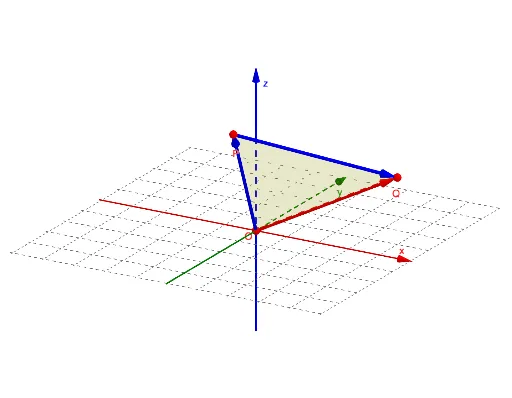
① This example demonstrates the geometric addition of two vectors in three‑dimensional space, showing how the resultant vector is formed. ② Core mathematical concepts include vectors, vector addition, 3D coordinate systems, and the use of planes and polygons as construction aids. ③ Construction highlights: Vector commands create u, v, w; Plane draws reference planes; Polygon builds auxiliary polygons; Textfield together with InputP/InputQ enables coordinate entry; buttons (button1‑button4) control animation steps; a speed slider adjusts playback rate; objects O, P, Q, c, h, i, poly, r, o, p serve as base points, endpoints, and intermediate construction elements. ④ Suitable for high‑school solid geometry and introductory university linear algebra courses, and for interactive classroom illustration of vector operations.
GeoGebra Commands & Parameters
Vector(O, P) → uVector(O, Q) → wPlane(O, P, Q) → cVector(P, Q) → vPolygon(O, P, Q) → poly, r, o, pTextfield(P) → InputPTextfield(Q) → InputQ
AI Drawing Prompt Reference
Draw a 3D coordinate system with an origin O and two movable endpoints P and Q. Show vectors u = OP and w = OQ, and the vector v = PQ connecting the tips. Include the plane through O, P, Q and the triangle O‑P‑Q as a filled polygon to illustrate the geometric addition of the two vectors in space. The coordinates of P and Q should be adjustable so the construction updates interactively.
The prompt above was compiled from the original drawing commands and is for reference only.