
Rectangular Coordinate System in Space (3D Coordinates)
Loading the math board and drawing, please wait…
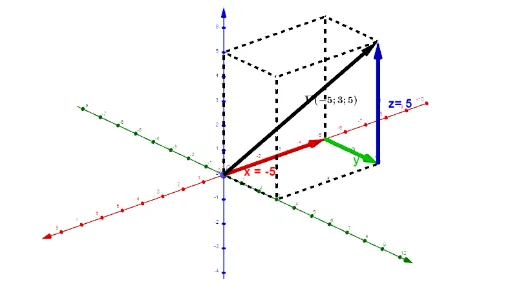
This GeoGebra example demonstrates a rectangular (Cartesian) coordinate system in three-dimensional space, allowing users to interactively explore how points are located by their (x, y, z) coordinates. The core mathematical concepts include 3D coordinate axes, coordinate planes, position vectors, and vector translation. The construction uses GeoGebra commands such as Textfield for entering coordinate values, Translate and Vector to build axis direction vectors, Midpoint and Segment for auxiliary constructions, along with buttons and sliders for dynamic control. Key objects include the origin O, points A, B, C, and various text labels. This resource is suitable for high school or early university students learning solid geometry, analytic geometry, or introductory vector algebra, and serves as an effective visual aid for teachers explaining spatial coordinates.
GeoGebra Commands & Parameters
Textfield(x1) → ChampTexte1Textfield(y1) → ChampTexte2Textfield(z1) → ChampTexte3Translate(O, Vector[(If[a ∧ b ∧ c ∧ 0 < o < 4, o / 4, 1] * Vector[O, O + (x1, 0, 0)])]) → O'Vector(O, O') → uTranslate(OO, Vector[(If[a ∧ b ∧ c ∧ 0 < o < 4, 0, If[4 < o < 8, (o - 4) / 4, 1]] * Vector[OO, B])]) → AVector(O', A) → vTranslate(B, Vector[(If[a ∧ b ∧ c ∧ 0 < o < 8, 0, If[8 < o < 12, (o - 8) / 4, 1]] * Vector[B, C])]) → B'Vector(A, B') → wTranslate(O, Vector[(If[a ∧ b ∧ c ∧ 0 < o < 12, 0, If[12 < o < 16, (o - 12) / 4, 1]] * Vector[O, C])]) → O'_1Vector(O, O'_1) → dMidpoint(O, OO) → DMidpoint(OO, B) → EMidpoint(B, C) → FMidpoint(O, O'_1) → KSegment(G, B) → fSegment(OO, B) → gSegment(B, C) → hSegment(C, J) → iSegment(C, H) → jSegment(H, OO) → kSegment(J, G) → lSegment(G, O) → mSegment(O, OO) → nSegment(I, J) → pSegment(H, I) → qSegment(I, O) → r