
Activity 4: Matrices as Linear Transformations
Loading the math board and drawing, please wait…
In collections
A geometric interpretation of matrices
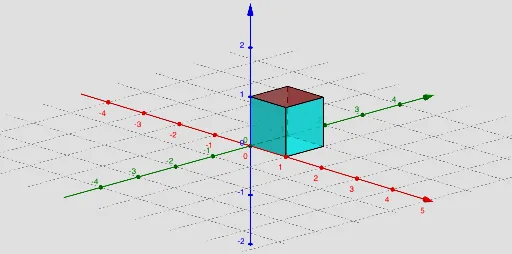
① This example demonstrates how a matrix acts as a linear transformation by deforming a 3D cube, showing changes in position, shape, and orientation. ② Core mathematical concepts include linear transformations, matrix multiplication, determinant as a scaling factor for area/volume, affine transformations, and geometric transformations in 3D space. ③ Construction highlights: GeoGebra commands such as ApplyMatrix are used to transform cube vertices, along with Vector, Circle, Line, Intersect, Segment, Point, Polygon, Determinant, Sequence, and SelectedIndex to build interactive elements and switch among multiple examples via sliders. ④ Suitable for high school to early university linear algebra or geometry courses, helping students visualize the geometric meaning of matrices, determinants, and transformation composition.
GeoGebra Commands & Parameters
SelectedIndex(Examples) → indexElement(MT, index) → T_0Vector((0, 0, 0), (x_0, y_0, z_0)) → uVector((0, 0, 0), (x_1, y_1, z_1)) → vVector((0, 0, 0), (x_2, y_2, z_2)) → wCircle(A, 1, xOyPlane) → cLine(A, xAxis) → fIntersect(f, c, 1) → BSegment(A, B) → gPoint(Circle[B, Distance[A, B], Segment[A, B]]) → CCube(A, B, C) → Cube, D, faceCDHG, faceEFGH, edgeAD, edgeAB, edgeBC, edgeCD, edgeAE, edgeDH, edgeEH, edgeEF, E, edgeBF, edgeFG, edgeCG, edgeGH, F, G, H, faceABCD, faceADHE, faceABFE, faceBCGFApplyMatrix(T_a, A) → A'ApplyMatrix(T_a, B) → B'ApplyMatrix(T_a, C) → C'ApplyMatrix(T_a, D) → D'ApplyMatrix(T_a, E) → E'ApplyMatrix(T_a, F) → F'ApplyMatrix(T_a, G) → G'ApplyMatrix(T_a, H) → H'Polygon(A', B', C', D') → poly1, a', b', c', d'Polygon(E', A', B', F') → poly2, e', a'_1, b'_1, f'Polygon(B', C', G', F') → poly3, b'_2, c'_1, g', f'_1Polygon(A', E', H', D') → poly4, a'_2, e'_1, h', d'_1Polygon(H', D', C', G') → poly5, h'_1, d'_2, c'_2, g'_1Polygon(H', E', F', G') → poly6, h'_2, e'_2, f'_2, g'_2Determinant(T_0) → deterSequence(Sequence[Sequence[(i, j, k), i, -4, 4, 8 / 3], j, -4, 4, 8 / 3], k, -4, 4, 8 / 3) → points3dElement(points3d, 1, 1) → KKASequence(OrthogonalLine[Element[KKA, i], z = 0], i, 1, 4) → list1Element(points3d, 1, 2) → KKA1Element(points3d, 1, 3) → KKA2Element(points3d, 1, 4) → KKA3Sequence(OrthogonalLine[Element[KKA1, i], z = 0], i, 1, 4) → list2Sequence(OrthogonalLine[Element[KKA2, i], z = 0], i, 1, 4) → list3Sequence(OrthogonalLine[Element[KKA3, i], z = 0], i, 1, 4) → list4Element(points3d, 2, 1) → KAElement(points3d, 3, 1) → KA1Element(points3d, 4, 1) → KA2Sequence(OrthogonalLine[Element[KKA, i], y = 0, space], i, 1, 4) → list5Sequence(OrthogonalLine[Element[KA1, i], y = 0, space], i, 1, 4) → list6Sequence(OrthogonalLine[Element[KA, i], y = 0, space], i, 1, 4) → list7Sequence(OrthogonalLine[Element[KA2, i], y = 0, space], i, 1, 4) → list8ApplyMatrix(T_a, list1) → list1'ApplyMatrix(T_a, list2) → list2'ApplyMatrix(T_a, list3) → list3'ApplyMatrix(T_a, list4) → list4'ApplyMatrix(T_a, list5) → list5'ApplyMatrix(T_a, list6) → list6'ApplyMatrix(T_a, list7) → list7'ApplyMatrix(T_a, list8) → list8'
AI Drawing Prompt Reference
Draw a 3D cube and transform it using a matrix to show changes in position, shape, and orientation. Construct the cube using vectors, circles, and lines to define its edges and faces. Apply a matrix transformation to each vertex of the cube, and draw the transformed cube. Calculate the determinant of the transformation matrix to illustrate the scaling of area or volume. Include interactive elements like sliders to switch between different transformation examples.
The prompt above was compiled from the original drawing commands and is for reference only.