
A1.ACE.2 - Equation of a Line: Interactive Slope Exploration
Loading the math board and drawing, please wait…
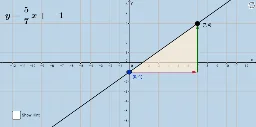
This GeoGebra applet provides an interactive environment for students to explore the relationship between the equation of a line in the coordinate plane, its slope, and its graphical representation. By manipulating points or sliders, learners can see in real time how changes in the coefficients of the linear equation affect the line's steepness and position, reinforcing the geometric meaning of slope. Core mathematical concepts include linear functions, standard forms of line equations (e.g., y = mx + b), slope and intercepts, and coordinate geometry. The construction uses GeoGebra commands such as Point, Line, Intersect, FractionText, Polygon, Vector, Length, and Distance to create dynamic objects like points A, B, C, line segments, and text labels that display computed values. Suitable for upper middle school or early high school students learning introductory analytic geometry, this applet serves both as a classroom demonstration tool and a self-guided exploration resource, bridging algebraic expressions and visual graphs.
GeoGebra Commands & Parameters
Point(a) → ALine(A, B) → bIntersect(c, d) → CFractionText(Slope[b]) → text1Polygon(A, C, B) → poly1, b_1, a_1, c_1Vector(A, C) → uVector(C, B) → vLength(u) → fDistance(A, C) → distanceACDistance(C, B) → distanceCB
AI Drawing Prompt Reference
Draw a coordinate plane with a straight line crossing it. Place two points on the line, one of which is the intersection with another reference line. Construct a right triangle using these three points as vertices, with one leg along the line and the other along the reference line. Add arrow vectors along the two legs and label their lengths numerically. Also display the slope of the line as a fraction text near the triangle, so the ratio of the legs matches the slope. The layout should clearly show the line, intersection, triangle, vectors, and length labels for interactive slope exploration.
The prompt above was compiled from the original drawing commands and is for reference only.