
A Visual “Proof Without Words” of the Pythagorean Theorem
Loading the math board and drawing, please wait…
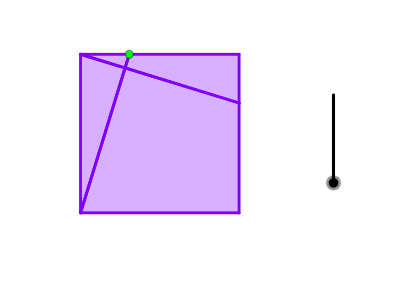
This example demonstrates a classic “proof without words” for the Pythagorean Theorem by using an interactive, geometry-based arrangement. It highlights how area relationships in a right triangle (connecting the legs and the hypotenuse) become visually evident through construction, rotation, and constrained intersections. The key mathematics includes the Pythagorean Theorem, right-triangle geometry, area correspondence via polygon layouts, and angle/circle constraints to lock the configuration. Construction is built from GeoGebra commands such as Polygon, Point, and Line for the geometric figures; OrthogonalLine and Intersect to create perpendiculars and intersection points; LineBisector and Angle to control and measure angular structure; Rotate and Circle to generate the required symmetric/rotated components; If for conditional enabling of steps; and Centroid to compute or track a pivotal point in the configuration. Suitable for advanced middle school through early university, especially for classroom demos and conceptual, visualization-first learning.
GeoGebra Commands & Parameters
Polygon(A, B, 4) → poly1, f, g, h, i, C, DLine(A, C) → tPoint(h) → ELine(A, E) → jOrthogonalLine(D, j) → kIntersect(j, k) → FLine(C, k) → lLine(A, D) → mIntersect(l, m) → HLineBisector(H, C) → nRotate(l, 45°, H) → l'Intersect(n, l') → JLine(D, B) → sCircle(O, Segment[J, H]) → qIntersect(q, t) → M, NCircle(M, Segment[F, D]) → s_1LineBisector(M, F) → h_1Intersect(q, s) → K, LOrthogonalLine(K, xAxis) → q_1OrthogonalLine(M, q_1) → t_1Intersect(s_1, t_1, 1) → A_1LineBisector(D, A_1) → b_1Circle(K, Segment[F, E]) → p_1Intersect(p_1, q_1) → V, WLineBisector(V, E) → r_1LineBisector(K, F) → rPolygon(D, F, E) → t1, e, d, f_1Polygon(D, A, F) → t2, f_2, d_1, aIntersect(k, g) → GPolygon(E, C, G, F) → q1, e_1, c, g_1, f_3Polygon(A, F, G, B) → q2, a_1, f_4, g_2, bLineBisector(D, H) → pRotate(m, 45°, D) → m'Intersect(p, m') → IIntersect(r_1, r) → PIntersect(b_1, h_1) → QAngle(H, C, D) → αLineBisector(L, F) → i_1LineBisector(N, F) → j_1If(0 < o ≤ 1, Polygon[Rotate[D, ((o - 0) * (π + α)), P], Rotate[F, ((o - 0) * (π + α)), P], Rotate[E, ((o - 0) * (π + α)), P]], If[o > 1, Polygon[Rotate[D, π + α, P], Rotate[F, π + α, P], Rotate[E, π + α, P]]]) → t3If(2 < o ≤ 3, Polygon[Rotate[D, ((o - 2) * (π + α)), Q], Rotate[A, ((o - 2) * (π + α)), Q], Rotate[F, ((o - 2) * (π + α)), Q]], If[o > 2, Polygon[Rotate[D, π + α, Q], Rotate[A, π + α, Q], Rotate[F, π + α, Q]]]) → t4Polygon(P, Q, 4) → poly2, k_1, l_1, m_1, n_1, T, UIf(4 < o ≤ 5, Polygon[Rotate[A, ((o - 4) * (π + α)), T], Rotate[F, ((o - 4) * (π + α)), T], Rotate[G, ((o - 4) * (π + α)), T], Rotate[B, ((o - 4) * (π + α)), T]], If[o > 5, Polygon[Rotate[A, π + α, T], Rotate[F, π + α, T], Rotate[G, π + α, T], Rotate[B, π + α, T]]]) → q5If(6 < o ≤ 7, Polygon[Rotate[E, ((o - 6) * (π + α)), U], Rotate[C, ((o - 6) * (π + α)), U], Rotate[G, ((o - 6) * (π + α)), U], Rotate[F, ((o - 6) * (π + α)), U]], If[o > 7, Polygon[Rotate[E, π + α, U], Rotate[C, π + α, U], Rotate[G, π + α, U], Rotate[F, π + α, U]]]) → q3Centroid(poly2) → RIntersect(h_1, r) → SCircle(R, P) → c_1Intersect(r_1, r) → ZIntersect(b_1, h_1) → B_1
AI Drawing Prompt Reference
Draw a right triangle ABC with AB as one of the legs and BC as the hypotenuse. Use rotation and symmetry to demonstrate that the sum of the squares of the two legs equals the square of the hypotenuse. The steps include constructing the right triangle, creating perpendicular lines, rotating line segments, generating circles and polygons, and finally using angle bisectors and rotations to show area relationships.
The prompt above was compiled from the original drawing commands and is for reference only.