
A Curve to the Same Curve Passing Through Another!
Loading the math board and drawing, please wait…
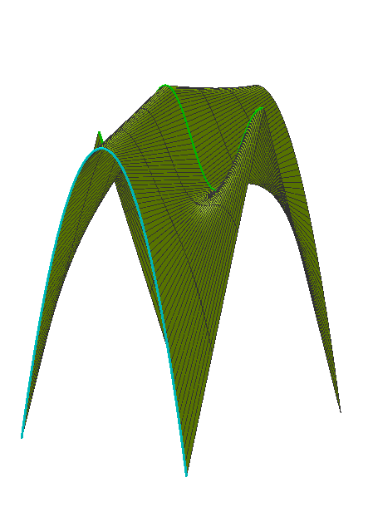
This example demonstrates the construction of a curve transitioning from one curve to the same curve while passing through another. It involves core mathematical concepts such as function graphs, coordinate geometry, logical reasoning, and quadratic equations. The construction uses GeoGebra commands like CurveCartesian and Surface, with objects including c1, c2, c3, a, c4, b, d, text1, text2, d', text3, botó1, botó2. It is suitable for high school mathematics students and teachers to understand transformations of function graphs and locus problems.
GeoGebra Commands & Parameters
CurveCartesian(t, 0, ((-c2) * cos((c1 * t))) + 1, t, 0, (2 * π)) → aCurveCartesian(t, c3, (-(t - π)^(2)) + c4, t, 0, (2 * π)) → bSurface(t, ((1 - u) * c3), ((1 - u) * ((-(t - π)^(2)) + c4)) + (u * (((-c2) * cos((c1 * t))) + 1)), u, 0, 1, t, 0, (2 * π)) → dSurface(t, ((-(1 - u)) * c3), ((1 - u) * ((-(t - π)^(2)) + c4)) + (u * (((-c2) * cos((c1 * t))) + 1)), u, 0, 1, t, 0, (2 * π)) → d'
AI Drawing Prompt Reference
Draw a curve transitioning from one curve to the same curve while passing through another. First, draw a horizontal line segment a, then draw a parabola b. Use the surface command to draw two transition surfaces d and d', covering the area between a and b, creating a smooth transition effect.
The prompt above was compiled from the original drawing commands and is for reference only.