
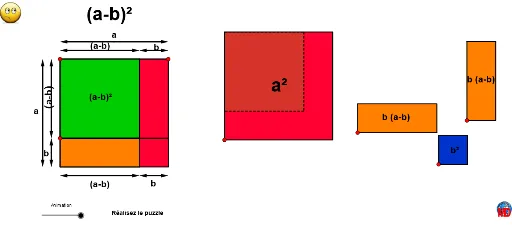
(a - b)^2 Geometric Demonstration
Loading the math board and drawing, please wait…
In collections
Algebraic puzzles for binomial formula
This example dynamically demonstrates the geometric representation of the algebraic expression (a - b)^2 in space. It involves core math concepts like algebraic expressions, vectors, distance, rotation, and translation. GeoGebra commands and objects such as Line, Point, Polygon, Intersect, Midpoint, Vector, RotateText, Translate, Distance, and Segment are used in construction. Suitable for high school mathematics education to understand the connection between algebra and geometry and enhance spatial reasoning skills.
GeoGebra Commands & Parameters
Line(A, xAxis) → aPoint(a) → BPolygon(B, A, 4) → poly1, b_1, c, d, e, C, DLine(A, C) → fPoint(c) → EPolygon(A, E, 4) → poly2, g, h, i, j, F, GLine(G, F) → kLine(E, F) → lLine(H, a) → mLine(I, f) → nLine(L, k) → pLine(K, d) → qLine(C, D) → rLine(B, D) → sIntersect(r, d) → MIntersect(k, r) → NIntersect(k, m) → OIntersect(m, s) → PIntersect(r, n) → QIntersect(q, k) → RMidpoint(O, P) → SMidpoint(H, O) → TIntersect(l, p) → ULine(W, a) → tLine(V, n) → a_1Intersect(a_1, r) → ZIntersect(s, t) → A_1Midpoint(W, A_1) → B_1Vector(B_1, A_1) → uVector(B_1, W) → vMidpoint(V, Z) → C_1Vector(C_1, V) → wVector(C_1, Z) → zVector(T, O) → bVector(T, H) → u_1Midpoint(J, Q) → D_1Midpoint(I, J) → E_1Midpoint(K, R) → F_1Intersect(s, q) → G_1Vector(S, P) → v_1Vector(S, O) → w_1Vector(D_1, J) → z_1Vector(D_1, Q) → c_1Vector(F_1, R) → d_1Vector(F_1, K) → e_1Midpoint(R, G_1) → H_1RotateText(texte5, 90°) → texte7Vector(H_1, G_1) → f_1Vector(H_1, R) → g_1Vector(E_1, I) → h_1Vector(E_1, J) → i_1Midpoint(G, E) → I_1Intersect(s, e) → N_1Intersect(l, s) → O_1Polygon(G, B, O_1, F) → poly3, n_1, p_1, b_2, d_2Vector(F, K_1) → j_1Polygon(E, F, N, C) → poly4, t_1, c_2, e_2, h_2Vector(C, L_1) → k_1Polygon(F, O_1, D, N) → poly5, f_2, o_2, d_4, n_2Vector(N, M_1) → l_1Translate(G, Vector[(Animation / 10 * j_1)]) → G'Translate(B, Vector[(Animation / 10 * j_1)]) → B'Translate(D, Vector[(Animation / 10 * j_1)]) → D'Vector(C, J_1) → m_1Translate(E, Vector[(Animation / 10 * k_1)]) → E'Translate(O_1, Vector[(Animation / 10 * k_1)]) → P_1Translate(D, Vector[(Animation / 10 * k_1)]) → D'_1Translate(F, Vector[(Animation / 10 * l_1)]) → F'Translate(O_1, Vector[(Animation / 10 * l_1)]) → Q_1Translate(D, Vector[(Animation / 10 * l_1)]) → D'_2Translate(N, Vector[(Animation / 10 * l_1)]) → N'_1Polygon(F', Q_1, D'_2, N'_1) → poly5', f', q_1, d'_2, n'_1Polygon(A, G, F, E) → poly6, a_2, g_3, f_3, e_3Translate(A, Vector[(Animation / 10 * m_1)]) → A'Translate(G, Vector[(Animation / 10 * m_1)]) → G'_1Translate(F, Vector[(Animation / 10 * m_1)]) → F'_1Translate(E, Vector[(Animation / 10 * m_1)]) → E'_1Polygon(A', G'_1, F'_1, E'_1) → poly6', a', g'_1, f'_1, e'_1Polygon(A, B, D, C) → poly7, a_3, b_3, d_5, c_3Translate(A, Vector[(Animation / 10 * m_1)]) → A'_1Translate(B, Vector[(Animation / 10 * m_1)]) → B'_1Translate(D, Vector[(Animation / 10 * m_1)]) → D'_3Translate(C, Vector[(Animation / 10 * m_1)]) → C'_1Polygon(A'_1, B'_1, D'_3, C'_1) → poly7', a'_1, b'_1, d'_3, c'_1Line(E'_1, F'_1) → r_1Line(G'_1, F'_1) → s_1Intersect(r_1, b'_1) → T_1Intersect(s_1, d'_3) → U_1Translate(E, Vector[(Animation / 10 * k_1)]) → E'_2Translate(F, Vector[(Animation / 10 * k_1)]) → F'_2Translate(N, Vector[(Animation / 10 * k_1)]) → N'_2Translate(C, Vector[(Animation / 10 * k_1)]) → C'Polygon(E'_2, F'_2, N'_2, C') → poly4', e'_2, f'_2, n'_2, c'Translate(G, Vector[(Animation / 10 * j_1)]) → G'_2Translate(B, Vector[(Animation / 10 * j_1)]) → B'_2Translate(O_1, Vector[(Animation / 10 * j_1)]) → R_1Translate(F, Vector[(Animation / 10 * j_1)]) → F'_3Polygon(G'_2, B'_2, R_1, F'_3) → poly3', g'_2, b'_2, r_2, f'_3Midpoint(B', F'_3) → S_1Midpoint(E', N'_2) → V_1Midpoint(A', F'_1) → W_1Midpoint(F, A) → Z_1Midpoint(F', D'_2) → A_2Distance(F'_1, K_1) → aaDistance(C'_1, L_1) → bbMidpoint(A', D'_3) → B_2Line(G'_1, F'_1) → g_2Intersect(g_2, d'_3) → C_2Distance(M_1, C_2) → ccIntersect(d'_3, b'_1) → D_2Segment(E_2, F_2) → i_2Segment(G_2, H_2) → j_2
AI Drawing Prompt Reference
Create a dynamic geometric diagram illustrating the algebraic identity (a-b)². Start with a horizontal line and a point on it as a vertex of a large square. Construct the large square, then choose a point on one of its sides to form a smaller square inside, sharing a vertex with the large square. Draw multiple auxiliary segments connecting vertices and intersection points to create a grid-like structure. Mark midpoints of various segments and draw vector arrows from these midpoints to adjacent vertices, representing translations and distances. Finally, rotate a text label by 90 degrees and place it within the diagram to annotate the expression. The overall figure consists of squares, line segments, intersection points, and vectors, demonstrating the geometric interpretation of the algebraic formula.
The prompt above was compiled from the original drawing commands and is for reference only.