
90 Degree Rotation about ANY POINT: Quick Exploration
Loading the math board and drawing, please wait…
In collections
Transformations! (Geometry)
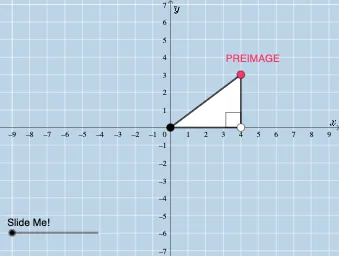
① This example demonstrates the geometric transformation of rotating a plane figure by 90 degrees about an arbitrary point (not necessarily the origin), allowing users to visually explore the positional relationship between the original and rotated shapes. ② Core mathematical concepts include rotation transformation, center of rotation, angle of rotation, corresponding points and segments, and the property that rotation preserves congruence and shape. ③ Construction highlights: Using GeoGebra commands such as Point, Polygon, Segment, Angle, Rotate, CircleArc, Line, and Mirror, the construction includes a center point CENTER, the original figure PREIMAGE, the rotated image IMAGE with corresponding points A' and B', and uses a slider or angle parameter α to control the rotation, while displaying auxiliary lines, arcs, and angle markers. ④ Suitable for middle and high school students learning geometric transformations, this interactive tool is ideal for classroom demonstrations or self-exploration to deepen understanding of rotation geometry and arbitrary rotation centers.
GeoGebra Commands & Parameters
Point(y = y(CENTER)) → BPoint(x = x(B)) → PREIMAGEPolygon(CENTER, B, PREIMAGE) → t1, c, a, bSegment(CENTER, B) → fSegment(B, PREIMAGE) → gSegment(PREIMAGE, CENTER) → hAngle(PREIMAGE, B, CENTER) → αRotate(CENTER, If[0 < d ≤ 180, (d * π / 180)], CENTER) → A'Rotate(B, If[0 < d ≤ 180, (d * π / 180)], CENTER) → B'Rotate(PREIMAGE, If[0 < d ≤ 180, (d * π / 180)], CENTER) → IMAGEPolygon(A', B', IMAGE) → t1', c', a', b'Segment(B', IMAGE) → iSegment(IMAGE, CENTER) → jSegment(CENTER, B') → kAngle(IMAGE, B', CENTER) → βCircleArc(CENTER, PREIMAGE, IMAGE) → eLine(CENTER, PREIMAGE) → lLine(CENTER, IMAGE) → mMirror(PREIMAGE, CENTER) → PREIMAGE'Mirror(IMAGE, CENTER) → IMAGE'Angle(PREIMAGE', CENTER, IMAGE') → δ
AI Drawing Prompt Reference
Draw a 90-degree rotation figure around a point. First, create a center point and an original triangle, then rotate the triangle 90 degrees around the center point to generate the rotated image. Use an angle parameter to control the rotation angle, and display the corresponding points and segments before and after rotation, as well as auxiliary lines and arcs.
The prompt above was compiled from the original drawing commands and is for reference only.