
9-Person Poll Probability & Statistics Tool: Edit Yellow Cells Only
Loading the math board and drawing, please wait…
In collections
Math Year 4 Unit Probability & Statistics
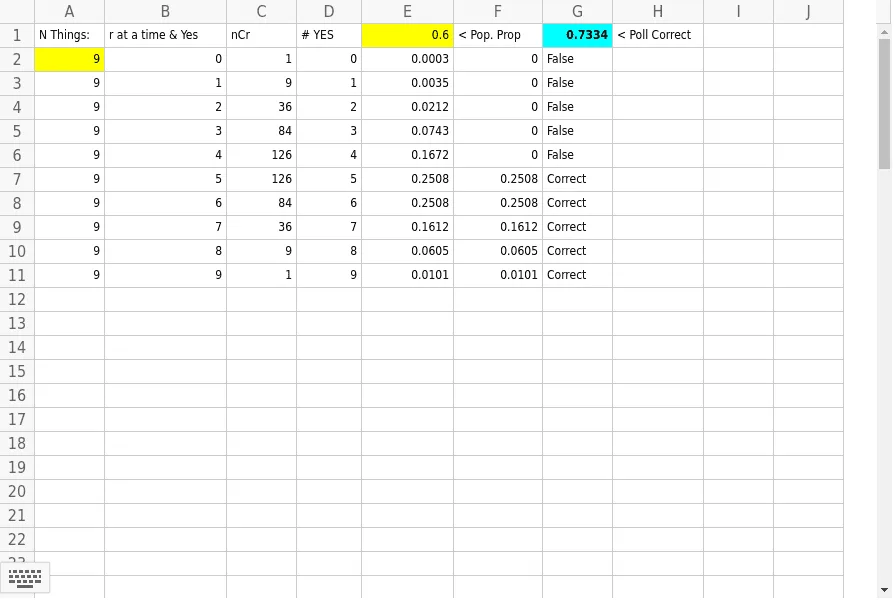
This example demonstrates how to use GeoGebra for probability and statistics in a 9-person poll. Core concepts include probability, statistics, geometric constructions, intersection, and continuity. The construction utilizes GeoGebra commands like If and Sum, along with objects A1-E11. Suitable for high school students and teachers for probability and statistics education and experimentation.
GeoGebra Commands & Parameters
If(B2 > (0.5 * A2), E2, 0) → F2If(B3 > (0.500000000000002 * A3), E3, 0) → F3If(B4 > (0.500000000000002 * A4), E4, 0) → F4If(B5 > (0.500000000000002 * A5), E5, 0) → F5If(B6 > (0.500000000000002 * A6), E6, 0) → F6If(B7 > (0.500000000000002 * A7), E7, 0) → F7If(B8 > (0.500000000000002 * A8), E8, 0) → F8If(B9 > (0.500000000000002 * A9), E9, 0) → F9If(B10 > (0.500000000000002 * A10), E10, 0) → F10If(B11 > (0.500000000000002 * A11), E11, 0) → F11Sum(F2:F20) → G1If(F2 > 0, "Correct", "False") → G2If(F3 > 0, "Correct", "False") → G3If(F4 > 0, "Correct", "False") → G4If(F5 > 0, "Correct", "False") → G5If(F6 > 0, "Correct", "False") → G6If(F7 > 0, "Correct", "False") → G7If(F8 > 0, "Correct", "False") → G8If(F9 > 0, "Correct", "False") → G9If(F10 > 0, "Correct", "False") → G10If(F11 > 0, "Correct", "False") → G11
AI Drawing Prompt Reference
Create an interactive table for a 9-person poll probability and statistics tool. The table has 11 rows, each containing cells for total voters, supporters, and a result column. For each row, if the supporter count exceeds half of the voter count, the result cell shows a correct mark; otherwise, it shows a false mark. At the top, display a sum of all correct results. Use a clean grid layout with editable cells highlighted in yellow, and other cells in white or light colors for educational clarity.
The prompt above was compiled from the original drawing commands and is for reference only.