
4D Frame Catapult
Loading the math board and drawing, please wait…
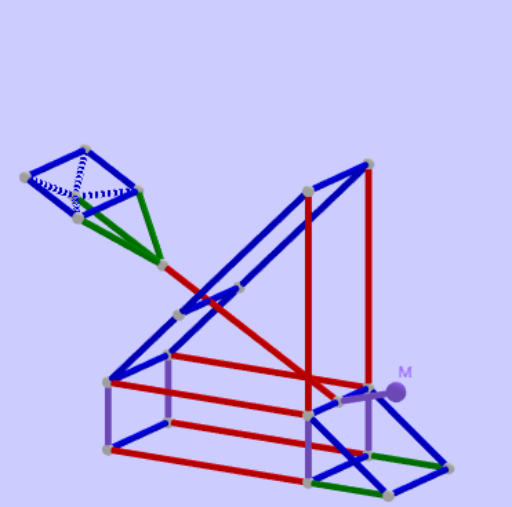
This example demonstrates a mathematical model of a 4D frame catapult, showcasing spatial geometric transformations through dynamic interactions. It involves core concepts like circles, stochastic processes, matrix operations, special points, and derivatives. Construction utilizes GeoGebra commands and objects such as points, segments, orthogonal planes, lines, circles, intersections, vectors, translations, rotations, etc. Suitable for high school and above learners to understand the integration of spatial geometry and linear algebra.
GeoGebra Commands & Parameters
Point(zAxis) → ASegment(O_1, PointIn[Sphere[O_1, 6]]) → b_5OrthogonalPlane(A, zAxis) → a_1OrthogonalLine(O_1, b_5, a_1) → c_5OrthogonalLine(O_1, a_1) → e_5Circle(A, (4 * a), e_5) → p_1Intersect(c_5, p_1) → U, VPoint(Circle[A, (5 * a), a_1]) → PSegment(A, P) → k_1Circle(A, (3 * a), k_1) → e_1Intersect(e_5, e_1) → S, TCircle(A, (10 * a), a_1) → d_1Intersect(c_5, d_1) → Q, ROrthogonalPlane(B, zAxis) → bOrthogonalLine(N_1, b_5, a_1) → d_5Segment(P_1, O_1) → f_6OrthogonalLine(P_1, c_5, a_1) → g_6Intersect(d_5, g_6) → R_1Segment(R_1, P_1) → h_6Segment(R_1, N_1) → i_6OrthogonalLine(Q_1, c_5, a_1) → j_6Intersect(d_5, j_6) → S_1Intersect(e_5, b) → T_1Vector(O_1, T_1) → u_1Translate(R_1, u_1) → U_1Translate(N_1, u_1) → W_1Translate(P_1, u_1) → V_1Segment(W_1, T_1) → i_1Segment(U_1, W_1) → k_6Segment(U_1, V_1) → l_6Segment(V_1, T_1) → m_6Segment(V_1, P_1) → n_6Segment(U_1, R_1) → p_6Segment(O_1, Q_1) → q_6Segment(N_1, S_1) → r_6Segment(S_1, Q_1) → s_6Segment(T_1, Q_1) → h_2Segment(W_1, S_1) → l_2Circle(T_1, m_6, i_1) → eIntersect(e_5, e) → D, ESegment(V_1, D) → nLine(U_1, n) → pLine(D, l_6) → qIntersect(p, q) → KSegment(K, D) → rSegment(U_1, K) → sSegment(B, A) → tMidpoint(i_1) → LSegment(D, B) → f_1Segment(K, W_1) → g_1Segment(W_1, N_1) → fCircle(L, f_1, i_1) → cCircle(L, (3 * a), i_1) → dMidpoint(m_6) → FCircle(l_6, F) → hIntersect(n, h) → G,Line(G, l_6) → iIntersect(i, s) → HSegment(H, G) → jMidpoint(j) → ISegment(I, L) → kRotate(I, (-(135°)), L, c) → I'Angle(I', L, I, c) → αSegment(L, I') → lIntersect(l, d, 1) → CLine(L, f_1) → gIntersect(g, d, 2) → JRotate(J, (-(135°)), L, d) → J'Angle(J', L, J, d) → βCircleArc(L, J', C, d) → c_1Point(c_1) → MSegment(M, L) → mRotate(M, 135°, L, d) → M'Angle(M, L, M', d) → γRay(L, M') → h_1Intersect(h_1, c) → N, OSegment(N, L) → j_1Line(N, j) → l_1Plane(h_1, l_1) → oCircle(N, (5 * a), o) → q_1Intersect(h_1, q_1) → Z, A_1OrthogonalLine(Z, o) → n_1Sphere(Z, (sqrt(2) * a / 2)) → uIntersect(n_1, u) → W, B_1Plane(B_1, o) → vLine(B_1, l_1) → m_1Line(B_1, h_1) → r_1Circle(B_1, (1.5 * a), v) → s_1Circle(B_1, (2.5 * a), v) → t_1Intersect(m_1, t_1) → C_1, D_1Intersect(r_1, s_1) → E_1, F_1Line(E_1, m_1) → b_1Line(F_1, m_1) → f_2Line(D_1, r_1) → g_2Line(C_1, r_1) → i_2Intersect(b_1, g_2) → H_1Intersect(b_1, i_2) → I_1Intersect(f_2, g_2) → J_1Intersect(i_2, f_2) → K_1Segment(H_1, I_1) → j_2Segment(I_1, K_1) → k_2Segment(K_1, J_1) → m_2Segment(J_1, H_1) → n_2Segment(H_1, Z) → p_2Segment(Z, K_1) → q_2Segment(Z, J_1) → r_2Segment(Z, I_1) → s_2Segment(J_1, N) → t_2Segment(Z, N) → a_2Segment(K_1, N) → b_2
AI Drawing Prompt Reference
Draw a 4D frame catapult model, including a central point O1, and construct a series of circles and lines around it, generating complex geometric structures through rotations and translations. Start by creating a plane A perpendicular to the Z-axis, then build a series of circles and lines on this plane, using intersections and rotations to generate more geometric elements, ultimately forming a complex 4D frame structure.
The prompt above was compiled from the original drawing commands and is for reference only.